How to Make ChatGPT Identify Missing Information
Have you ever asked ChatGPT to complete a task, received a detailed answer, and then realized that something important was missing from the conversation?
Perhaps you asked it to create a marketing strategy without sharing your budget. Maybe you requested an SEO article without explaining your target audience. Or you asked it to analyze a document without providing the supporting data needed to reach a reliable conclusion.
ChatGPT may still produce a complete-looking answer.
But a complete-looking answer does not necessarily mean it had all the information required to produce a useful result.
The solution is to make ChatGPT check the information you have provided before it starts working.
Instead of asking it to answer immediately, instruct it to identify what it knows, what is missing, what needs verification, and which missing details could change the outcome.
In this guide, you’ll learn how to make ChatGPT identify missing information, ask relevant questions, distinguish important gaps from minor details, and avoid filling missing information with unsupported assumptions.
The quickest way to make ChatGPT identify missing information
You do not need a complicated prompt to get started.
Copy the following instruction and use it before your next request.
The Missing Information Checker Prompt
Copy and paste:
Before completing my request, examine the information I have provided.
Identify:
- What important information is already available.
- What information is missing.
- Which missing details could materially change the result.
- Which details are optional and can reasonably be assumed.
- What facts, sources, or supporting evidence need verification.
Do not fill important gaps with invented information or unsupported assumptions.
If essential information is missing, ask me up to 3 concise, high-priority clarifying questions and wait for my answers.
If enough information is available, proceed with the task.
Before giving your final answer, briefly disclose any important assumptions or information you could not verify.
How to use it: Paste this prompt into ChatGPT, then add your actual request.
For example:
“Create a marketing strategy for my online clothing business.”
Rather than immediately generating a generic marketing plan, ChatGPT should first consider whether it has enough information about the business, target customers, location, budget, and marketing objective.
It should then ask about the most important missing details instead of making everything up.
The important part is the instruction to distinguish between information that is essential and information that can reasonably be assumed.
Why does ChatGPT sometimes answer without having all the information?
ChatGPT is designed to respond to the information and instructions available in a conversation. When a request is incomplete, it may still generate an answer based on context, learned patterns, and assumptions.
For example, consider this request:
“Write a professional email to my client about the delay.”
Several important details are missing:
- What caused the delay?
- How long will the delay last?
- What was originally promised?
- Is the relationship with the client formal or informal?
- Should the email apologize, explain, or request an extension?
ChatGPT can write an email without knowing these details. However, it may produce a generic message or invent a reason for the delay if the prompt does not clearly restrict it.
This is why providing context matters.
OpenAI’s prompting best practices recommend making instructions clear and specific and supplying enough context for the model to understand what you want. They also recommend reviewing and refining prompts when the initial result needs improvement.
There is another important limitation: ChatGPT can sometimes produce incorrect or misleading information while sounding confident. OpenAI explains this in its guidance on whether ChatGPT tells the truth.
The practical lesson is that you should not judge an answer only by how complete or professional it sounds.
First, check whether the information needed to produce that answer was actually available.
What types of information can ChatGPT identify as missing?
Not every information gap is the same.
Sometimes ChatGPT needs more context from you. In other situations, it needs supporting evidence, a document, or current information from an external source.
Understanding the difference makes the technique much more useful.
| Type of missing information | What ChatGPT should identify | Example |
|---|---|---|
| Context | Background needed to understand the request | What type of business do you operate? |
| Objective | What you want to achieve | Is the goal traffic, leads, or sales? |
| Audience | Who the output is intended for | Beginners or experienced professionals? |
| Constraints | Limitations that affect the solution | Budget, deadline, location, or resources |
| Requirements | Specific things the result must include | Required sections or technical specifications |
| Evidence | Supporting information needed for a conclusion | Customer research or sales figures |
| Source material | Documents or data that have not been provided | A missing report or spreadsheet |
| Current information | Facts that may have changed | Current product pricing or features |
This distinction is important.
If you ask ChatGPT to analyze your sales performance but have not uploaded the sales figures, the problem is not necessarily that you need to explain your business in more detail.
The missing information is the actual data.
If you ask for the latest pricing of a product, ChatGPT may need to search a current source rather than ask you to provide a price you do not know.
A useful information checker should identify the type of gap before recommending what to do next.
The four-step method: Check, Classify, Clarify, Complete
To make this process easier to remember, use this four-step framework.
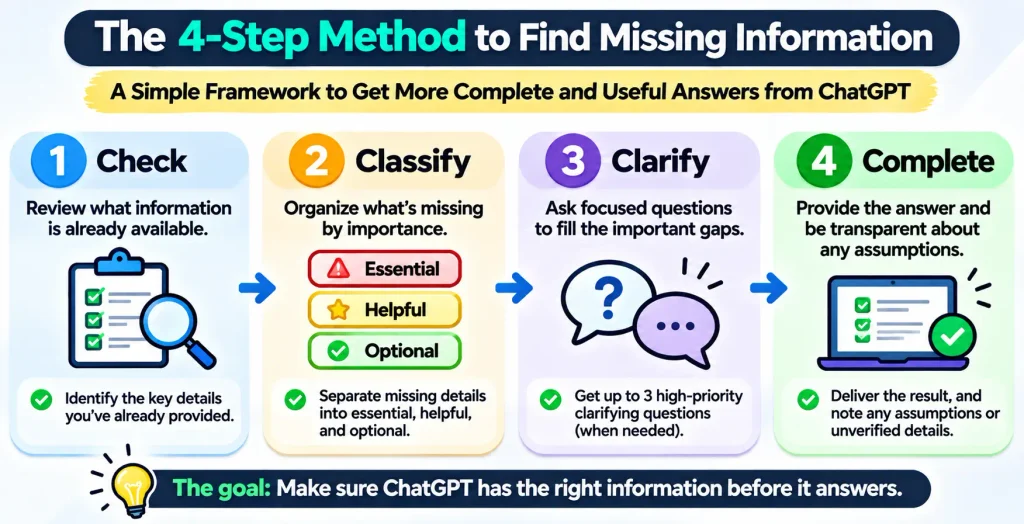
1. Check what information is already available.
Before asking questions, ChatGPT should review the conversation and any relevant material you have supplied.
For example, if you have already explained your business, it should not ask you to describe the business again.
This reduces repetitive questions and makes the interaction more efficient.
2. Classify the missing information
Ask ChatGPT to separate missing details into three categories:
- Essential: The task cannot be completed usefully or reliably without this information.
- Helpful: The information could improve the result, but a reasonable assumption is possible.
- Optional: The information is unlikely to change the result meaningfully.
This classification prevents ChatGPT from treating every missing detail as a reason to stop.
3. Clarify the important gaps
If essential information is missing, ChatGPT should ask concise questions.
It should prioritize the questions that could have the biggest impact on the result.
For example, when creating a business plan, knowing what the business sells is more important than knowing which font you prefer for the document.
4. Complete the task and disclose important assumptions
Once enough information is available, ChatGPT should proceed.
If a minor detail remains unknown, it can make a reasonable assumption and disclose it.
If a factual claim cannot be verified, it should identify that limitation rather than presenting a guess as a fact.
The complete workflow looks like this:
Your request → Information check → Gap classification → Clarifying questions or verification → Final answer
The purpose is not to make ChatGPT ask more questions. It is to help it recognize what it needs before producing an answer.
7 practical ChatGPT prompts to identify missing information
The main prompt works for general tasks. These specialized versions are useful when you regularly work in a particular area.
1. Prompt for writing and content creation
A common problem with AI-generated content is that the model starts writing before understanding the intended reader or purpose.
Use this prompt:
Prompt:
Before writing anything, review my content request and identify the information you need.
Check whether you understand:
- The topic and main objective.
- The target audience.
- The search intent, if this is an SEO article.
- The geographic market, if relevant.
- The desired tone and writing style.
- The required length and format.
- Important points, examples, or sources that must be included.
Separate essential information from optional details.
If an important requirement is missing, ask me up to 3 high-priority questions and wait for my answers.
Do not invent research, statistics, quotations, or personal experiences to fill information gaps.
If you already have enough context, proceed with the writing.
When to use it: Blog posts, website copy, landing pages, newsletters, scripts, reports, and social media content.
2. Prompt for research and fact-checking
Research tasks often require more than a topic.
The time period, geographic scope, source quality, and type of evidence can change the answer significantly.
Prompt:
Before starting this research task, examine my request and identify what information is missing.
Check:
- Whether the research question is sufficiently specific.
- Whether the geographic scope is clear.
- Whether the relevant time period is defined.
- Whether reliable sources or supporting documents are available.
- Whether the research requires current information.
- Whether there are important definitions or limitations that need clarification.
Tell me what is missing and why it matters.
Ask only the questions that could materially change the research. Do not invent sources, citations, statistics, or findings.
Clearly distinguish verified information from assumptions and unresolved questions.
When to use it: Academic research, market research, competitor analysis, technical research, and fact-heavy articles.
3. Prompt for business planning
A business plan created without understanding the business can look impressive while being impractical.
Prompt:
Review my business planning request before creating a strategy.
Identify missing information about:
- Business model and products or services.
- Target customers.
- Market and geographic location.
- Budget and available resources.
- Competitors.
- Business objectives.
- Timeline and operational constraints.
- Existing performance data, if available.
Classify each missing detail as essential, helpful, or optional.
Ask me up to 3 important questions first. If additional information can be reasonably assumed, state the assumption instead of delaying the task.
Do not invent financial figures or market research.
When to use it: Business plans, marketing strategies, startup planning, sales strategies, and growth proposals.
4. Prompt for coding and technical projects
A coding request may be missing requirements that determine the entire implementation.
Prompt:
Before writing code, review my requirements and identify missing technical information.
Check for:
- Programming language and framework.
- Runtime or development environment.
- Expected inputs and outputs.
- Required functionality.
- Dependencies and integrations.
- Compatibility requirements.
- Security or performance constraints.
- Error-handling expectations.
Separate essential requirements from implementation preferences.
Ask me concise questions about anything that could materially change the solution. Do not invent technical requirements without identifying your assumptions.
If the requirements are sufficient, proceed and explain any important assumptions.
When to use it: Software development, automation, website projects, APIs, debugging, and technical documentation.
5. Prompt for data analysis
One of the biggest problems with data analysis is drawing conclusions before understanding the dataset.
Prompt:
Before analyzing the data I provide, inspect the available information and identify what is missing or unclear.
Check:
- What each column or variable represents.
- Whether units and definitions are clear.
- Whether the dataset covers the required time period.
- Whether important values are missing or inconsistent.
- Whether the sample size is sufficient for the requested analysis.
- Whether additional context is needed to interpret the results.
Do not invent missing values or silently change the dataset.
Explain which limitations could affect the analysis and ask for clarification when necessary.
Distinguish observations from interpretations and conclusions.
When to use it: Excel files, business reports, sales analysis, surveys, financial data, and research datasets.
6. Prompt for important decisions
When making a decision, missing information can change which option is most suitable.
Prompt:
Before recommending a decision, examine the information I have provided.
Identify missing details about:
- My main objective.
- Available options.
- Priorities and decision criteria.
- Budget and other constraints.
- Timeline.
- Potential risks.
- Relevant evidence.
- Trade-offs between the available options.
Tell me which missing details could change your decision.
Ask up to 3 high-priority questions if necessary. Do not assume that one option is best without understanding my priorities.
If enough information is available, compare the alternatives and explain the assumptions behind your recommendation.
When to use it: Career decisions, purchasing decisions, business choices, project selection, and strategic planning.
7. Prompt for uploaded documents
Uploading a document does not automatically mean it contains everything needed to answer your question.
For example, a contract may refer to an attachment that has not been supplied. A financial report may contain totals but not the underlying transactions.
Prompt:
Review the document or documents I have provided in relation to my request.
Identify:
- What information the documents actually contain.
- What information is missing.
- Which claims or conclusions are not supported by the supplied material.
- Whether the documents refer to missing attachments, datasets, or external sources.
- What additional evidence would be required for a reliable answer.
Do not fill gaps with general knowledge without clearly identifying it as external context.
Distinguish between information stated in the documents, reasonable interpretations, and unanswered questions.
If essential material is missing, tell me exactly what I should provide.
When to use it: Contracts, reports, research papers, proposals, presentations, policy documents, and financial statements.
Real-world example: Ask ChatGPT to check missing information before creating a marketing strategy
Let’s see how the technique works in practice.
Imagine you send this request:
“Create a marketing strategy for my business.”
What happens without an information check?
ChatGPT may immediately create a strategy containing:
- Social media marketing.
- Search engine optimization.
- Paid advertising.
- Email marketing.
- Influencer partnerships.
- Content marketing.
These are possible marketing channels, but they may not be suitable for your actual business.
For example, the strategy could recommend paid advertising without knowing whether you have a budget.
It could suggest Instagram without knowing whether your customers use that platform.
It could recommend SEO without understanding whether your business depends on local customers or a national audience.
What happens with an information check?
You first ask ChatGPT:
“Before creating the strategy, identify the information you are missing that could materially affect the recommendation.”
A useful response might identify these questions:
- What products or services does your business offer?
- Who is your primary target customer?
- What location or market are you targeting?
Depending on your answers, it may then need to clarify the budget or marketing objective.
The important difference is that ChatGPT is no longer choosing a strategy before understanding the basic requirements.
It is checking the information first.
What if you don’t know all the answers?
You do not need to have every detail ready.
You can tell ChatGPT:
“I am not sure about my target audience yet. Help me identify possible customer groups based on the product and market information I provide.”
This changes the task.
Instead of asking you for information you do not have, ChatGPT can help you investigate or develop it.
That is a useful distinction between missing information and information that still needs to be discovered.
How to stop ChatGPT from guessing when information is missing
Sometimes you do not want ChatGPT to fill gaps at all.
This is especially important for research, financial analysis, technical work, and professional documents.
Add the following instruction:
No-Guessing Prompt:
Do not invent information to complete an incomplete request.
If a required fact, figure, source, date, or detail is unavailable:
- Clearly identify what is missing.
- Explain why it matters.
- Tell me whether it can be verified using an available source.
- Ask me for the information if I am the only person who can provide it.
- If it cannot be verified, label it as unknown or unverified.
Never present an assumption as a confirmed fact.
This is particularly useful when the output must be accurate.
OpenAI’s guidance on ChatGPT accuracy explains that models can produce fabricated citations, incorrect facts, and confident answers to ambiguous questions. It recommends checking important information against reliable sources. Read Does ChatGPT tell the truth?.
One additional point: asking ChatGPT to provide a source is not the same as verifying the source. Open the reference, check that it exists, and confirm that it actually supports the claim.
Can you make ChatGPT check missing information automatically?
Yes. If you want this behavior to apply across multiple conversations, you can add a preference to ChatGPT’s Custom Instructions.
OpenAI describes Custom Instructions as a way to tell ChatGPT what you would like it to consider when responding. Changes apply across chats, and the feature is available on supported ChatGPT plans and platforms.
How to add the instruction
On web or desktop:
- Open ChatGPT.
- Go to Settings.
- Select Personalization.
- Open Custom Instructions.
- Add your preferred instruction.
- Save your changes.
On supported mobile apps, look under Settings and Customize ChatGPT.
For the latest instructions, see OpenAI’s Custom Instructions guide.
Recommended Custom Instructions text
You can use this shorter version:
“Before completing my request, check whether you have enough information to provide a useful and specific answer. Identify important missing context, requirements, evidence, and constraints. If essential information is missing, ask me up to 3 concise, high-priority questions and wait for my response. Do not ask unnecessary questions or request information you can reasonably infer. Never invent missing facts or sources. If you have enough information, proceed directly. Briefly disclose important assumptions or unverified details when relevant.”
This instruction creates a useful default without forcing ChatGPT to ask questions before every simple request.
It is a preference, not a guarantee that every missing detail will be detected.
Common mistakes when using missing-information prompts
1. Asking ChatGPT to identify everything that is missing
Every task has some unknowns.
If you ask ChatGPT to identify every possible missing detail, it may produce an unnecessarily long list.
Better approach: Ask it to prioritize information that could materially change the outcome.
2. Confusing essential information with helpful information
A missing detail does not always prevent a task from being completed.
For example, a short introductory paragraph can usually be written without knowing the exact publication date.
Better approach: Ask ChatGPT to classify missing details as essential, helpful, or optional.
3. Letting ChatGPT ask too many questions
A long questionnaire can make a simple task unnecessarily complicated.
Better approach: Set a limit of three high-priority questions for most everyday tasks. More complex projects can be handled in additional rounds.
4. Asking the user for information ChatGPT could verify
If you want current product pricing, asking you to provide the price may not be the best next step.
ChatGPT may be able to search for current information, depending on the tools available.
Better approach: Ask it to distinguish between information it needs from you and information it can retrieve or verify independently.
5. Assuming an information audit guarantees accuracy
ChatGPT may overlook an important gap or incorrectly decide that it has enough context.
Better approach: Review the final answer, especially when it involves important factual, technical, legal, medical, or financial claims.
Frequently asked questions
How do I make ChatGPT tell me what information is missing?
Use a prompt that instructs ChatGPT to review your request, identify available information, list important missing details, and ask clarifying questions when necessary. Tell it to prioritize gaps that could materially change the result rather than listing every possible unknown.
What is the best prompt for finding missing information in ChatGPT?
A useful prompt is:
“Before answering, identify what information I have provided, what is missing, and which missing details could materially change the result. Ask me up to three important clarifying questions if necessary. Do not invent facts or make unsupported assumptions. If enough information is available, proceed.”
Can ChatGPT identify missing context automatically?
ChatGPT can be instructed to check for missing context before completing a task. However, it may not detect every gap. Giving it a clear checklist of the information to examine can make the process more consistent.
How do I stop ChatGPT from making assumptions?
Tell ChatGPT to identify unknown information, distinguish assumptions from verified facts, and ask questions when an important detail is missing. You can also instruct it not to invent figures, sources, dates, or other factual details.
Can ChatGPT tell me what information it needs before writing an article?
Yes. Ask it to review your topic, audience, search intent, geographic target, purpose, tone, length, and required sources before drafting. It can identify which details are missing and ask you to clarify the most important ones.
Should ChatGPT ask questions every time before answering?
No. Requiring questions before every response can make simple tasks unnecessarily slow. It is better to ask ChatGPT to clarify only when missing information could materially affect the result.
What is the difference between missing information and missing context?
Missing context usually refers to background needed to understand a request, such as the user’s objective, audience, or circumstances. Missing information is broader and can include data, evidence, documents, technical requirements, and current facts.
Final takeaway: Check the information before asking for the answer
ChatGPT does not need a longer prompt every time you want a better result.
Sometimes it needs a better understanding of what you are asking.
Before your next important task, give it a moment to examine the information available. Ask it to identify what is missing, separate essential details from optional ones, and explain whether it needs clarification or additional evidence.
Then let it complete the task.
Remember these four steps:
- Check what information is already available.
- Classify what is missing and how important it is.
- Clarify the gaps that could change the result.
- Complete the task without inventing unsupported details.
The real advantage is not getting ChatGPT to ask more questions.
It is getting ChatGPT to recognize when it does not yet have enough information to give you a useful answer.
Check first. Clarify what matters. Then answer.