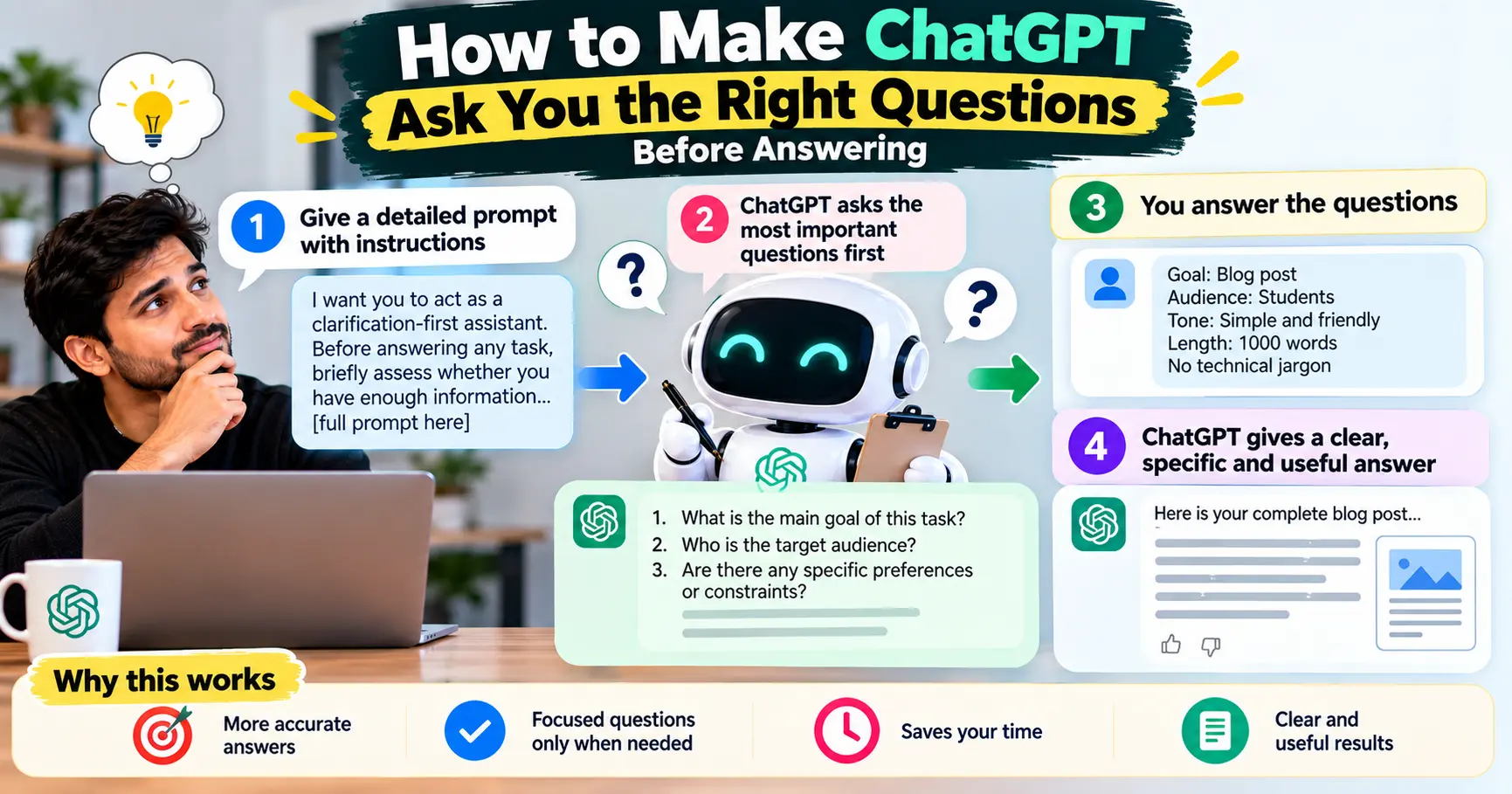
How to Make ChatGPT Ask You the Right Questions Before Answering
Learn how to make ChatGPT ask the right clarifying questions before answering, with a copy-and-paste prompt, examples, Custom Instructions, and practical tips.
Most people use ChatGPT as if it already knows exactly what they mean.
They type something like:
“Write me a marketing plan.”
And ChatGPT immediately starts writing.
The result may look polished, but it can still be wrong for the situation. It may assume the wrong audience, budget, location, business model, goal, tone, timeline, or level of expertise.
There is a simple way to reduce this problem: tell ChatGPT to ask you clarifying questions before it answers when important information is missing.
But there is a catch.
If you simply tell ChatGPT, “Ask me questions before answering,” it may ask too many questions, ask things that do not matter, or turn a simple request into an unnecessary interview.
The better solution is to give ChatGPT a decision rule:
Ask only the questions that could materially change the answer. Ask them before doing the task. If enough information is already available, proceed without asking unnecessary questions.
That small distinction makes the technique much more useful.
The simplest prompt to make ChatGPT ask questions first
If you want a quick solution, paste this before your request:
Before answering, check whether you have enough information to give me a useful and specific answer. If important information is missing and that information could materially change your answer, ask me the necessary clarifying questions first. Ask no more than 3–5 questions at a time. Do not ask questions whose answers would not meaningfully affect the result. Once you have enough information, answer the original request directly. If you already have enough context, skip the questions and proceed.
Then add your actual request.
For example:
Before answering, check whether you have enough information to give me a useful and specific answer. If important information is missing and that information could materially change your answer, ask me the necessary clarifying questions first. Ask no more than 3–5 questions at a time. Do not ask questions whose answers would not meaningfully affect the result. Once you have enough information, answer the original request directly. If you already have enough context, skip the questions and proceed.
I want you to create a content strategy for my website.
Instead of immediately producing a generic content strategy, ChatGPT should have a reason to ask about things such as the website’s topic, audience, business goal, existing content, or geographic market—if those details actually affect the strategy.
Why asking questions first can improve ChatGPT’s answers
A language model can generate a response even when your request is underspecified.
That is both useful and dangerous.
Suppose you ask:
“Write a landing page for my business.”
There are dozens of missing variables:
- What does the business sell?
- Who is the customer?
- What action should visitors take?
- What makes the business different?
- Is the page targeting search traffic, paid ads, existing customers, or referrals?
- What tone should the copy use?
- What objections do customers have?
- Is there a particular location being targeted?
ChatGPT can make assumptions about these details and produce something that sounds convincing.
The problem is that polished writing is not the same thing as correct writing.
OpenAI’s own prompting guidance recommends making prompts clear and specific and providing enough context for the model to understand the task. It also recommends iterative refinement rather than expecting the first prompt to be perfect.
Asking a good clarification question is essentially another way of supplying that missing context.
The key idea: not every missing detail matters
This is where many “ask questions first” prompts go wrong.
Imagine you ask:
“Give me three ideas for a vegetarian dinner.”
ChatGPT probably does not need to ask ten questions.
It might reasonably answer immediately.
But now change the request:
“Create a seven-day dinner plan for my family.”
Now details such as the number of people, dietary restrictions, allergies, cooking time, budget, and preferences could substantially change the answer.
The goal is therefore not maximum questioning.
The goal is useful clarification.
A good rule is:
If the missing information could materially change the answer, ask about it. If it would only make the answer slightly different, make a reasonable assumption and continue.
That is the principle that makes this technique practical.
The better prompt: ask, prioritize, then answer
For more reliable results, use a slightly more detailed version.
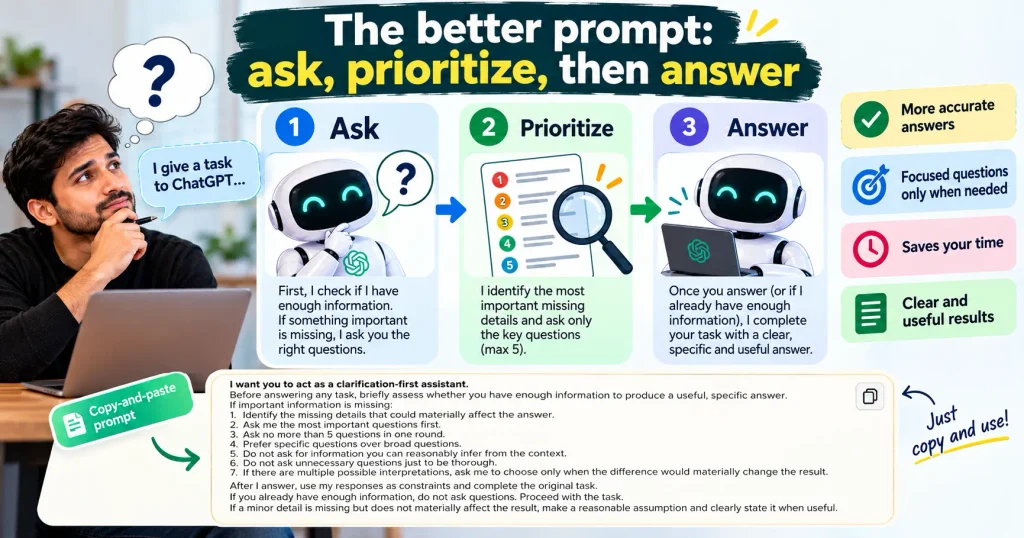
Copy-and-paste prompt
I want you to act as a clarification-first assistant.
Before answering any task, briefly assess whether you have enough information to produce a useful, specific answer.
If important information is missing:
- Identify the missing details that could materially affect the answer.
- Ask me the most important questions first.
- Ask no more than 5 questions in one round.
- Prefer specific questions over broad questions.
- Do not ask for information you can reasonably infer from the context.
- Do not ask unnecessary questions just to be thorough.
- If there are multiple possible interpretations, ask me to choose only when the difference would materially change the result.
After I answer, use my responses as constraints and complete the original task.
If you already have enough information, do not ask questions. Proceed with the task.
If a minor detail is missing but does not materially affect the result, make a reasonable assumption and clearly state it when useful.
This version is better because it gives ChatGPT criteria, rather than simply telling it to “ask questions.”
What makes a clarification question a good question?
A useful clarification question should have a purpose.
Consider this request:
“Help me write a blog post about electric cars.”
A weak clarification prompt might produce:
- What is your favorite electric car?
- What color should the article use?
- What is your personal opinion about EVs?
- How many paragraphs do you like?
- What day do you want to publish it?
Most of these questions do not necessarily determine the quality of the article.
A better set could be:
- Who is the article intended for?
- What is the main search intent or question you want it to answer?
- Which country or market are you targeting?
- Do you want a beginner-friendly overview or a more technical article?
- Are there specific electric-car models or topics that must be covered?
Each answer can materially affect the article.
That’s the difference between asking questions and asking useful questions.
Give ChatGPT a maximum question limit
One of the easiest improvements is to set a limit.
Without one, a clarification-first prompt can sometimes turn into a long questionnaire.
Try:
“Ask no more than 3 important questions before proceeding.”
Or, for complex work:
“Ask up to 5 questions in the first round. Prioritize the questions that would have the biggest impact on the final result.”
This keeps the interaction efficient.
For everyday tasks, three questions are often enough.
For complex work—such as research, business strategy, content planning, software specifications, or a detailed report—five may be more appropriate.
The exact number is less important than the principle: ask enough to remove meaningful uncertainty, but not so many that the user has to complete a form before getting help.
Tell ChatGPT what kinds of things it should clarify
You can make the behavior more predictable by defining the categories it should check.
For example:
Before answering, check whether the task requires clarification about:
- my goal
- target audience
- context
- location or market
- constraints
- budget
- deadline
- tone
- required format
- examples or reference material
Only ask about categories that are genuinely relevant to the task.
This is particularly useful for professional work.
A writer may care about audience and tone.
A developer may care about the programming language, environment, and requirements.
A business owner may care about budget, customers, location, and objective.
A student may care about education level, assignment requirements, and desired explanation depth.
You do not need ChatGPT to ask every category every time.
The final sentence—“Only ask about categories that are genuinely relevant”—is important.
Use the “materially changes the answer” test
This is probably the most useful rule in the entire technique.
Tell ChatGPT:
Only ask a clarifying question if the answer could materially change your recommendation, analysis, output, or conclusion.
Why does this work?
Because almost every task contains missing information.
If ChatGPT tried to eliminate every uncertainty, it would never get started.
Suppose you ask:
“Give me five headline ideas for an article about remote work.”
ChatGPT could ask:
- What’s your favorite writing style?
- What’s your company’s annual revenue?
- Which browser do you use?
- What time do you normally publish?
- What is your office address?
None of these necessarily matters.
But if the request is:
“Create five SEO titles for my article about remote work,”
then search intent, target audience, geographic market, and the article’s actual angle may matter.
The “materially changes the answer” test helps ChatGPT distinguish between important uncertainty and irrelevant uncertainty.
Make ChatGPT explain why it needs a question
You can go one step further.
Ask ChatGPT to briefly explain the purpose of each question.
For example:
If you ask me a clarification question, briefly explain why the answer matters.
The interaction could then look like this:
ChatGPT:
Who is the article for—beginners, experienced professionals, or business owners?
Why this matters: the examples, terminology, and level of explanation will change depending on the audience.
This can be useful when you are learning how to work with AI because you can see which variables actually affect the output.
However, you do not need this explanation every time. For fast workflows, it may simply create extra text.
Before and after: a practical example
Let’s say you type:
“Create a workout plan for me.”
Without clarification
ChatGPT may immediately generate a generic routine.
It has to guess:
- fitness level
- goal
- available equipment
- schedule
- experience
- limitations
- preferred activities
The answer may be perfectly readable but poorly matched to the person.
With clarification-first prompting
ChatGPT could instead ask:
What is your primary goal—strength, muscle gain, endurance, general fitness, or something else?
How many days per week can you realistically train?
What equipment do you have access to?
Those three answers can dramatically change the plan.
This illustrates the real benefit of the technique:
You are moving important assumptions from ChatGPT’s imagination into the conversation.
Another example: using ChatGPT for writing
Consider this request:
“Write an email asking for a raise.”
A generic answer might be usable, but the right email depends heavily on context.
A clarification-first ChatGPT might ask:
- Is this a formal email to your manager or a more conversational message?
- Do you want to request a specific salary increase or start a compensation discussion?
- What achievements or additional responsibilities should the message mention?
Those questions directly affect the finished email.
Now compare that with a question such as:
“What font does your company normally use?”
That might matter in some circumstances, but it is probably not important enough to delay the writing.
Again, the objective is not to collect every possible detail.
It is to collect the details that change the work.
You can also tell ChatGPT when NOT to ask questions
This is surprisingly important.
Try adding:
Do not ask clarifying questions when the task is simple, the missing information is minor, or a reasonable assumption will produce a useful answer.
This prevents the clarification-first behavior from becoming annoying.
For example:
“Give me three alternatives for the word ‘important.’”
There is little reason to ask a series of questions.
ChatGPT can simply answer.
But:
“Rewrite this paragraph for a medical audience while preserving its technical accuracy.”
Now clarification may be useful if the intended audience, reading level, or regulatory context is unclear.
The best workflow: clarify only when necessary
A useful mental model is:
Request → Check uncertainty → Ask important questions → Receive answers → Complete task
Not:
Request → Ask 20 questions → Ask 20 more → Finally answer
You can express that workflow directly in your prompt:
Follow this workflow:
Step 1: Understand my request.
Step 2: Identify any missing information that could materially affect the result.
Step 3: If important information is missing, ask the highest-priority questions first.
Step 4: Wait for my response instead of completing the task prematurely.
Step 5: Once you have enough information, complete the original request.
Step 6: If some minor uncertainty remains, make a reasonable assumption rather than asking unnecessary questions.
This is especially useful for larger tasks.
What if there are two possible interpretations?
Sometimes a question is ambiguous, but asking the user may not be necessary.
For example:
“Compare Apple and Google.”
That could mean:
- companies
- stock investments
- smartphones
- ecosystems
- AI products
- financial performance
Here, the interpretation matters a lot.
You can tell ChatGPT:
If my request has multiple plausible interpretations and choosing the wrong one would materially change the answer, ask me which interpretation I mean before proceeding.
That is much better than letting ChatGPT silently choose one.
For less important ambiguity, you can use:
If the ambiguity is minor, choose the most reasonable interpretation, state your assumption briefly, and continue.
This gives you a balance between accuracy and speed.
A powerful version for research and fact-heavy work
For research, you can make the clarification prompt stricter.
Use:
Before starting research, identify any missing information that could change the scope, sources, geography, time period, audience, or conclusions. Ask only the highest-value clarifying questions first. Do not begin with unsupported assumptions. Once the scope is clear, research the question and distinguish verified facts from assumptions or interpretation.
This is useful because research questions often hide several variables.
For example:
“What is the best AI tool for businesses?”
That is not really one question.
The answer could change depending on:
- business size
- industry
- budget
- privacy requirements
- existing software
- use case
- team size
- geographic market
- need for integrations
A research-oriented workflow should clarify the variables that actually affect the comparison.
OpenAI’s current Deep Research guidance follows a similar broad pattern: define the desired outcome and context, answer clarifying questions where prompted, and then refine the research as needed.
How to make this behavior permanent with Custom Instructions
If you want ChatGPT to use this behavior repeatedly, you can put a version of the instruction in Custom Instructions rather than pasting it into every conversation.
OpenAI says Custom Instructions let you tell ChatGPT what you want it to consider in its responses, and they are available on web, desktop, iOS, and Android.
OpenAI’s personalization guidance even gives a similar example of a guardrail:
“Ask clarifying questions if requirements are unclear.”
A good Custom Instructions version
You can use:
When my request is ambiguous or missing important information, ask concise clarifying questions before answering. Only ask questions when the missing information could materially affect the answer. Prioritize the highest-impact questions and ask no more than 3 at a time unless the task genuinely requires more. Do not ask unnecessary questions when a reasonable assumption is enough. If you make an assumption, state it briefly when it matters. Once you have enough information, complete the task without repeatedly asking for confirmation.
This is short enough to be practical while still defining the behavior clearly.
Remember that Custom Instructions are a preference layer, not a guarantee that every response will follow the exact workflow perfectly. OpenAI describes them as a way to customize how ChatGPT responds, while individual prompts still provide task-specific instructions.
Should you put this in every prompt?
Not necessarily.
There are three good ways to use the technique.
| Situation | Best approach |
|---|---|
| Simple question | Just ask the question |
| Complex one-off task | Add a clarification-first instruction |
| Repeated professional workflow | Use Custom Instructions |
| Research project | Define scope and ask for clarification before research |
| Writing project | Ask about audience, purpose, tone and constraints when relevant |
| Ambiguous request | Explicitly tell ChatGPT to clarify before proceeding |
For a simple factual question, adding a long clarification framework can actually make the interaction slower.
The goal is better communication, not more prompting.
A shorter prompt for everyday ChatGPT use
If the longer version feels excessive, use this:
Before answering, check whether you are missing any information that could materially change the answer. If so, ask me up to 3 concise clarifying questions first. If not, answer directly. Don’t ask unnecessary questions or make me provide information you can reasonably infer.
This is probably the version most people will actually use.
A version for writers and content creators
If you regularly use ChatGPT to create content, try this:
Before writing, check whether you have enough information about the topic, target audience, search intent, geographic market, purpose, tone, format, and key requirements. Only ask about information that could materially affect the content. Ask up to 5 high-priority questions first. If the missing detail is minor, make a reasonable assumption. Once the requirements are clear, create the content without asking unnecessary follow-up questions.
This is particularly useful for blog posts, landing pages, newsletters, scripts, social content, and SEO briefs.
It also prevents a common AI-writing problem: generating 2,000 words before discovering that the audience or purpose was misunderstood.
A version for coding
Developers can use the same idea differently.
Before writing code, check whether any important technical requirements are missing. Ask only questions that could materially change the implementation, such as programming language, runtime, framework, input/output requirements, compatibility constraints, security requirements, or expected behavior. Ask up to 5 high-priority questions. If a reasonable default exists, state the assumption and continue.
This can save time on larger coding tasks.
For example, “Build me an API” is underspecified.
But asking:
“Which language should I use?”
may be far more important than asking about minor implementation preferences.
The point is to clarify requirements, not micromanage every implementation detail.
A version for business decisions
For strategy and decision-making, the questions should focus on constraints.
Try:
Before giving me a recommendation, identify the factors that could materially change the decision. Ask me only the highest-impact questions, such as my objective, budget, constraints, priorities, timeline, risk tolerance, or alternatives already being considered. If the information is sufficient, make the recommendation and explain the key assumptions behind it.
This is more useful than simply asking ChatGPT to “ask questions.”
A good recommendation depends on the decision criteria.
For example, the “best” project-management software can differ dramatically depending on whether the company values price, security, integrations, reporting, ease of use, or enterprise administration.
Common mistakes when using clarification prompts
1. Telling ChatGPT to ask questions about everything
This creates friction.
The purpose is not to make ChatGPT interrogate you.
Better: tell it to ask only questions that materially affect the answer.
2. Asking for too many questions at once
A 15-question questionnaire can discourage users from continuing.
Better: ask the highest-priority questions first.
If the answers reveal that more information is needed, continue with another short round.
3. Asking questions ChatGPT could answer itself
If you ask:
“Write a short introduction for a blog post.”
ChatGPT does not necessarily need to ask what a “short introduction” means. It can make a reasonable interpretation.
Better: reserve clarification for meaningful uncertainty.
4. Forgetting to tell ChatGPT to wait
If you want a true question-first workflow, say:
“Ask the questions first and wait for my answers before completing the task.”
Otherwise, the model may ask questions and then continue answering based on its assumptions.
5. Treating every assumption as a problem
Some assumptions are unavoidable.
If you ask for:
“Three casual subject lines for a coffee shop newsletter,”
ChatGPT can probably proceed without knowing the exact coffee shop’s seating capacity.
Better: distinguish between information that is useful and information that is necessary.
6. Expecting the prompt to guarantee perfect behavior
A prompt influences behavior; it does not turn ChatGPT into a deterministic form.
Even a carefully written instruction can be interpreted imperfectly.
OpenAI’s prompting guidance emphasizes iterative refinement and making the task, context, constraints, and desired output clear.
If the behavior matters for an important workflow, review the result rather than assuming the instruction worked perfectly.
The most useful rule to remember
If you remember only one sentence from this article, make it this:
Tell ChatGPT to ask questions only when the missing information could materially change the answer.
That one rule solves two opposite problems.
Without clarification, ChatGPT may make too many assumptions.
With unrestricted clarification, ChatGPT may ask too many questions.
The goal is somewhere in the middle.
Ask when uncertainty matters. Infer when it doesn’t. Then answer.
FAQ
Can I make ChatGPT always ask questions before answering?
You can instruct ChatGPT to ask clarifying questions when important information is missing, including through Custom Instructions. However, it is better to define a condition for asking rather than requiring questions before every response. Some requests are already clear enough to answer directly.
What is the best prompt for making ChatGPT ask questions first?
A practical version is:
“Before answering, check whether you are missing information that could materially change the answer. If so, ask me up to 3 concise clarifying questions first. If not, answer directly. Don’t ask unnecessary questions or ask for information you can reasonably infer.”
You can adapt the question limit and categories to your workflow.
Can ChatGPT ask follow-up questions automatically?
ChatGPT can ask follow-up or clarifying questions as part of a conversation, but you should not assume it will always do so simply because a request is ambiguous. Giving it an explicit instruction can make your desired workflow clearer. OpenAI also documents workflows, such as Deep Research, where clarifying questions are part of the process.
Should I put the prompt in Custom Instructions?
If you want the behavior across many conversations, Custom Instructions are a sensible place for it. If you only need clarification for one complicated task, putting the instruction directly in that prompt is usually simpler. OpenAI says Custom Instructions apply to future conversations and are available across supported ChatGPT platforms.
How many questions should ChatGPT ask?
There is no universal number. For most everyday tasks, 1–3 high-impact questions are enough. Complex projects may need more, but it is usually better to ask the most important questions first rather than presenting a long questionnaire.
What if I don’t want ChatGPT to ask questions unnecessarily?
Tell it explicitly:
“Do not ask clarifying questions when a reasonable assumption is sufficient.”
You can also add:
“Only ask if the missing information could materially change the answer.”
These instructions help balance accuracy with speed.
Is asking questions better than giving ChatGPT a detailed prompt?
Not always.
A detailed prompt gives ChatGPT useful context immediately. Clarifying questions are most useful when you don’t know what information matters yet, or when the task has important unknowns.
The two approaches work well together: provide what you already know, then let ChatGPT identify the important gaps.
Final takeaway
The best way to make ChatGPT ask better questions is not to tell it to “ask questions before every answer.”
Give it a smarter rule.
Tell it to:
- Understand the task.
- Check for missing information.
- Identify which missing details actually matter.
- Ask only the highest-impact questions.
- Avoid questions that can be answered through reasonable assumptions.
- Wait for your response when clarification is necessary.
- Complete the original task once enough information is available.
That turns ChatGPT from a system that simply reacts to your first sentence into something closer to a collaborative assistant that helps define the task before doing the work.
And that is often where better AI output starts—not with a longer prompt, but with fewer assumptions.
Quick-copy prompt
Save this if you want a simple version you can reuse:
Before answering my request, check whether you have enough information to give me a useful and specific answer. If important information is missing and it could materially change the result, ask me up to 3 concise clarifying questions first and wait for my answers. Prioritize the questions that have the biggest impact. Do not ask unnecessary questions or ask for information you can reasonably infer. If you already have enough context, answer directly. If a minor uncertainty remains, make a reasonable assumption and state it briefly when relevant.
The principle is simple: clarify what matters, infer what doesn’t, and then answer.