
Discover 50+ Claude prompts for writing, research, editing, SEO, fact-checking, long documents, academic work, and critical analysis. Copy and customize them for better Claude results.
Claude can produce a polished paragraph in seconds.
The harder part is getting it to produce something that is actually useful: a researched article instead of generic filler, a thoughtful critique instead of empty praise, or a research summary that clearly separates evidence from interpretation.
That is where the prompt matters.
The best Claude prompts for writing and research don’t simply tell Claude what to produce. They define the job, context, audience, evidence standard, constraints, and desired output.
This guide gives you 60 Claude prompts you can copy, adapt, and reuse in 2026. They cover long-form writing, editing, research, SEO, fact-checking, academic work, business writing, long-document analysis, and critical thinking.
Quick answer
If you want better results from Claude, don’t start with:
“Write an article about X.”
Give Claude five things instead:
Role + Task + Context + Constraints + Output format
For example:
You are an experienced technology journalist. Write a 1,500-word explainer for Indian first-time AI users comparing Claude with competing AI assistants. Focus on practical use cases, pricing differences, writing quality, research capabilities, and limitations. Avoid unsupported benchmark claims and clearly distinguish current facts from general observations. Use examples and finish with a decision checklist.
That prompt gives Claude a much clearer assignment.
What Makes a Good Claude Prompt?
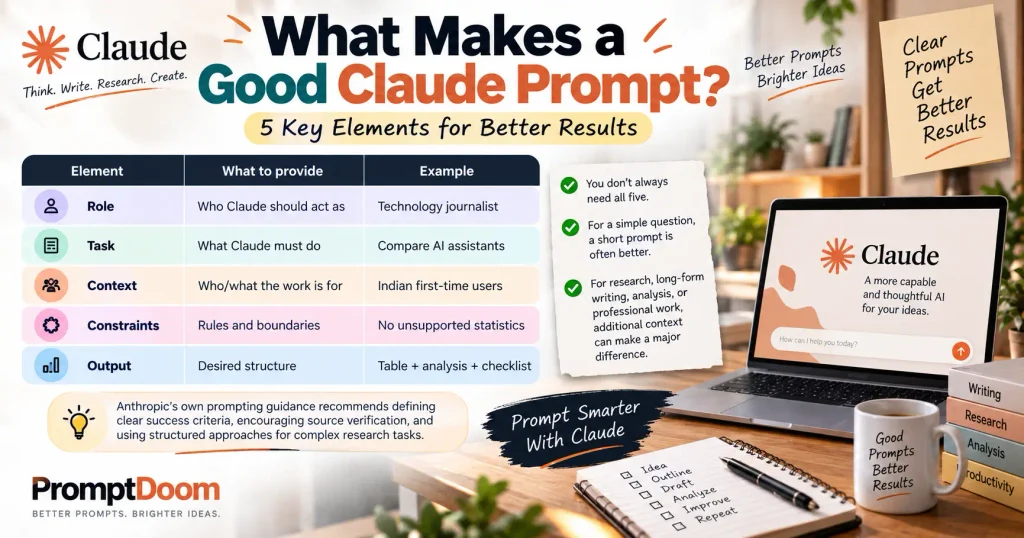
A useful Claude prompt normally answers five questions:
| Element | What to provide | Example |
|---|---|---|
| Role | Who Claude should act as | Technology journalist |
| Task | What Claude must do | Compare AI assistants |
| Context | Who/what the work is for | Indian first-time users |
| Constraints | Rules and boundaries | No unsupported statistics |
| Output | Desired structure | Table + analysis + checklist |
You don’t always need all five.
For a simple question, a short prompt is often better.
For research, long-form writing, analysis, or professional work, however, additional context can make a major difference.
Anthropic’s own prompting guidance recommends defining clear success criteria, encouraging source verification, and using structured approaches for complex research tasks.
60 Claude Prompts for Writing and Research
Claude Prompts for Long-Form Writing
1. Write a complete article from a brief
You are an experienced [INDUSTRY] writer.

Write a comprehensive article about [TOPIC] for [TARGET AUDIENCE].

Primary goal:
[WHAT THE READER SHOULD LEARN OR ACHIEVE]

Cover:
- [POINT 1]
- [POINT 2]
- [POINT 3]
- [POINT 4]

Tone: [TONE]
Length: approximately [WORD COUNT] words.

Start by identifying the reader's main problem or question. Answer it early, then expand with explanations, examples, practical advice, limitations, and common mistakes.

Do not pad the article to reach the word count. Prioritize useful information and specificity.
Best for: Blog posts, guides, explainers, and evergreen content.
2. Turn rough notes into an article
Turn the following rough notes into a publication-ready article.

Audience: [AUDIENCE]
Topic: [TOPIC]
Tone: [TONE]
Approximate length: [LENGTH]

Preserve the factual meaning of my notes, but reorganize them into a logical structure.

Do not invent facts to fill gaps.

Where my notes are unclear, flag the issue instead of guessing.

Make the final article readable, specific, and useful rather than simply expanding every bullet.

NOTES:
[PASTE NOTES]
Why it works: You’re asking Claude to edit and structure information rather than inventing an entire article from a vague topic.
3. Create an expert-level explainer
Explain [TOPIC] to an intelligent reader who understands the basics but wants a deeper understanding.

Structure the explanation around:
1. What it is
2. How it works
3. Why it matters
4. A practical example
5. Where people commonly misunderstand it
6. Important limitations
7. When the concept is actually useful

Avoid unnecessary jargon. When technical terminology is necessary, explain it in plain language.
4. Write for beginners without making the content simplistic
Write a beginner-friendly guide to [TOPIC].

Assume the reader has no specialist knowledge but is capable of understanding nuanced explanations.

Define important terms before using them.
Use concrete examples.
Explain why each step matters.
Avoid talking down to the reader.

Include a section called "What beginners usually get wrong" and explain how to avoid those mistakes.
5. Create a detailed comparison
Compare [OPTION A], [OPTION B], and [OPTION C] for [TARGET AUDIENCE].

Evaluate them using:
- Price/cost
- Core capabilities
- Ease of use
- Best use cases
- Limitations
- Learning curve
- Long-term suitability

Do not declare a universal winner.

Instead, explain which option makes the most sense for different types of users.

Use a comparison table followed by a detailed explanation.
6. Create a step-by-step guide
Write a step-by-step guide explaining how to [TASK].

For every major step, explain:
- What to do
- Why it matters
- What could go wrong
- How to check whether the step worked

Assume the reader will actually follow these instructions, so avoid vague advice such as "optimize" or "make it better" without explaining how.
7. Increase an article’s information gain
Analyze the article below.

Identify:
- Generic statements
- Repeated information
- Missing explanations
- Unsupported claims
- Questions a reader would still have
- Places where a concrete example would help

Then rewrite the article so that it provides more practical value without simply making it longer.

ARTICLE:
[PASTE ARTICLE]
8. Turn an article into a stronger editorial piece
Rewrite this article so it has a clearer editorial point of view.

Do not manufacture controversy.

Instead:
- Identify the central argument
- Explain why it matters
- Present evidence
- Address reasonable objections
- Add nuance
- End with a practical takeaway

Keep factual claims grounded in the supplied material.
Claude Prompts for Editing and Improving Writing
9. Improve clarity without changing meaning
Edit the following text for clarity and readability.

Preserve the original meaning, facts, and intended tone.

Fix:
- Awkward sentences
- Repetition
- Unclear references
- Unnecessary jargon
- Weak transitions

Do not add new claims unless explicitly requested.

TEXT:
[PASTE TEXT]
10. Make writing sound more natural
Rewrite this text so it sounds like it was written by an experienced human writer.

Use natural sentence variation and specific language.

Remove:
- Generic filler
- Repetitive sentence structures
- Empty transitions
- Excessive adjectives
- Corporate clichés
- Artificially enthusiastic language

Do not introduce grammatical errors or slang simply to make it sound "human."

TEXT:
[PASTE TEXT]
11. Remove formulaic AI writing
Act as a strict human editor.

Review the following text for signs of formulaic AI writing.

Look for:
- Repetitive paragraph structures
- Generic introductions
- Overuse of words such as "moreover," "furthermore," and "delve"
- Empty claims
- Repeated conclusions
- Excessive headings
- Unnecessary summaries
- Artificially polished transitions

Then rewrite the weak sections.

TEXT:
[PASTE TEXT]
12. Make an article more specific
Review this article sentence by sentence.

Whenever a statement is vague or generic, ask whether it can be made more concrete.

Replace general statements with:
- Examples
- Scenarios
- Specific explanations
- Comparisons
- Practical consequences

Do not invent statistics or personal experiences.

Return the revised article.
13. Tighten a bloated article
Edit this article to make it approximately [X]% shorter without losing important information.

Prioritize removing:
- Repetition
- Filler
- Obvious statements
- Redundant examples
- Overlong introductions

Keep the strongest explanations and practical details.

Do not sacrifice nuance merely to make the article shorter.
14. Strengthen weak paragraphs
Identify the five weakest paragraphs in this article.

For each one:
1. Explain why it is weak.
2. Identify what information is missing.
3. Rewrite it with stronger reasoning and specificity.

Do not rewrite the entire article.

ARTICLE:
[PASTE ARTICLE]
15. Improve an introduction
Rewrite the introduction to [TOPIC].

The first paragraph should establish the reader's actual problem.

The introduction should:
- Get to the point quickly
- Explain why the topic matters
- Give the reader a reason to continue
- Avoid generic openings

Do not use phrases such as "in today's fast-paced world" or "in the ever-changing landscape of."

Write three different versions.
16. Improve a conclusion
Write a concise conclusion for this article.

Do not repeat every section.

Instead:
- Reinforce the central lesson
- Explain what the reader should do next
- Mention the most important caveat if necessary
- End with a useful takeaway

ARTICLE:
[PASTE ARTICLE]
Claude Prompts for Research
Claude’s current Research feature is designed for more complex research tasks. Anthropic says Research can conduct multiple searches, pursue different angles, and return findings with citations; it requires web search and is available on paid Claude plans.
17. Build a research plan
I need to research [TOPIC].

Create a rigorous research plan.

Identify:
- The main questions that need answering
- Subquestions
- Primary sources I should look for
- Secondary sources that may provide context
- Statistics that require verification
- Potentially controversial claims
- Common misconceptions
- Information that is likely to become outdated

Prioritize primary and authoritative sources where possible.
See Also :- Importance of Prompting: Why Writing a Good Prompt Actually Matters
18. Find gaps in existing research
I am researching [TOPIC].

Based on the material I provide, identify what is still missing.

Separate your findings into:
- Established information
- Questions requiring further research
- Claims requiring verification
- Areas where sources disagree
- Important perspectives not represented

Do not fill missing information with guesses.
19. Research a topic from multiple perspectives
Analyze [TOPIC] from at least four perspectives:

1. Consumer/user
2. Business/industry
3. Technical
4. Regulatory/social

For each perspective, identify:
- Main benefits
- Main concerns
- Evidence
- Important uncertainties

Clearly distinguish factual evidence from interpretation.
20. Evaluate source quality
I have several sources about [TOPIC].

Create a source-quality assessment.

For each source, evaluate:
- Authority
- Primary vs secondary status
- Publication date
- Evidence quality
- Potential bias
- Relevance to my specific question
- Whether the source supports the claim being made

Do not judge a source simply because you agree or disagree with its conclusion.
21. Separate facts from interpretation
Analyze the following research material.

Create three categories:

FACT:
Directly supported by the material.

INTERPRETATION:
A reasonable conclusion drawn from the evidence.

UNSUPPORTED:
A claim that the material does not adequately establish.

Do not silently upgrade interpretation into fact.

MATERIAL:
[PASTE MATERIAL]
22. Find contradictions between sources
Compare these sources on [QUESTION].

Identify:
- Where they agree
- Where they disagree
- Whether the disagreement is factual, methodological, definitional, or based on different dates
- Which source provides stronger evidence for each disputed point

Do not force a conclusion if the evidence remains ambiguous.

SOURCES:
[PASTE SOURCES]
23. Create a literature review
Using the research material below, create a structured literature review on [TOPIC].

Organize the material by:
- Major themes
- Areas of agreement
- Areas of disagreement
- Methodological differences
- Emerging questions
- Research gaps

Do not simply summarize each paper one after another.

Synthesize the findings across sources.
24. Extract findings from a long document
Analyze the document below.

Extract:
- Main findings
- Important statistics
- Methodology
- Limitations
- Important definitions
- Conclusions
- Claims that require careful interpretation

For each important finding, identify where in the supplied document it appears.

Do not add information that is not present in the document.
Claude Prompts for Fact-Checking
25. Fact-check an article
Act as a rigorous fact-checking editor.

Review the article below.

Create a table with:
Claim | Evidence needed | Status | Reason

Classify claims as:
- Supported
- Partially supported
- Unsupported
- Potentially outdated
- Opinion rather than fact

Pay particular attention to numbers, dates, product capabilities, rankings, quotes, and superlative claims.

Do not assume a claim is true merely because it sounds plausible.
26. Find claims that need citations
Review this article and identify every statement that would benefit from a citation.

Prioritize:
- Statistics
- Research findings
- Market claims
- Historical facts
- Product capabilities
- Legal or regulatory claims
- Medical or scientific claims
- Quotes

Do not flag obvious common-knowledge statements unnecessarily.
27. Audit statistics
Audit every numerical claim in this text.

For each number, identify:
- What exactly it measures
- The date or period
- The population/sample
- Whether it is a percentage, absolute figure, estimate, or projection
- What source would be needed to verify it

Flag numbers that could be misleading without additional context.
Claude Prompts for SEO and GEO
28. Build an SEO content brief
Create an SEO content brief for:

Primary keyword: [KEYWORD]
Audience: [AUDIENCE]
Location: [LOCATION]

Identify:
- Search intent
- Likely reader questions
- Important related concepts
- Suggested article structure
- Topics that deserve deeper treatment
- Potential FAQ questions
- Opportunities for original information gain

Do not recommend keyword stuffing.
Focus on satisfying the underlying search intent.
29. Improve an article for search intent
Analyze this article against the search intent behind [KEYWORD].

Tell me:
1. What the searcher most likely wants
2. Whether the article answers that need early enough
3. What important questions remain unanswered
4. What sections are unnecessary
5. What practical information should be added

Then provide a revised structure.
30. Create answer-first content
Rewrite the beginning of this article so that the direct answer appears within the first few paragraphs.

Then provide supporting explanation, examples, exceptions, and practical guidance.

The reader should understand the core answer without reading the entire article.
31. Optimize for AI search and answer engines
Review this article for answer-engine visibility.

Improve:
- Clear definitions
- Direct answers
- Explicit comparisons
- Structured explanations
- Concise factual statements
- Useful examples
- Question-and-answer sections where genuinely useful

Do not add unnatural keyword repetition.

The article should remain useful to a human reader first.
32. Identify missing related questions
For the topic [TOPIC], list the questions a searcher is likely to ask immediately before, during, and after their main query.

Group them into:
- Beginner questions
- Practical questions
- Comparison questions
- Troubleshooting questions
- Advanced questions

Prioritize questions that genuinely add information rather than simply repeating the main keyword.
Claude Prompts for Content Strategy
33. Build a content cluster
Create a content cluster around [MAIN TOPIC].

Provide:
- One pillar article
- 10-15 supporting articles
- Search intent for each
- Suggested primary keyword
- How each article connects to the pillar
- Which topics should be prioritized first

Avoid creating multiple articles that satisfy essentially the same intent.
34. Find content gaps
I publish content about [NICHE].

Based on the topics below, identify opportunities competitors or existing content commonly overlook.

Focus on:
- Practical problems
- Comparisons
- Decision-making
- Beginner confusion
- Advanced use cases
- Emerging questions

For each opportunity, explain why it would be useful to the reader.
35. Turn one article into a content system
Take this article and create a content repurposing plan.

Turn it into:
- 5 social posts
- 3 short-form video ideas
- 1 newsletter
- 5 FAQ answers
- 1 checklist
- 1 downloadable resource

Keep every derivative piece faithful to the original facts.

ARTICLE:
[PASTE ARTICLE]
Claude Prompts for Academic and Professional Research
36. Understand a research paper
Explain this research paper to me.

Use this structure:

1. Research question
2. Why the question matters
3. Method
4. Main findings
5. What the findings actually establish
6. What they do not establish
7. Limitations
8. Practical implications

Explain technical concepts in plain English without oversimplifying them.
37. Critique a research paper
Act as a skeptical but fair academic reviewer.

Critique this paper for:
- Research design
- Sample
- Methodology
- Statistical reasoning
- Causal claims
- Limitations
- Alternative explanations
- Generalizability

Do not criticize the paper merely because you disagree with its conclusions.

Separate genuine methodological problems from reasonable choices.
38. Compare research papers
Compare these papers on [TOPIC].

Create a table covering:
- Research question
- Dataset/sample
- Method
- Main finding
- Limitations
- Strength of evidence

Then explain why their conclusions differ, if they do.
39. Generate research questions
I am studying [FIELD/TOPIC].

Generate 20 research questions that are:
- Specific
- Researchable
- Meaningful
- Narrow enough for a realistic project

Avoid questions that can be answered with a simple Google search.

For each question, explain what evidence would be needed.
40. Turn a broad topic into a research question
My broad topic is:

[TOPIC]

Help me narrow it into a strong research question.

Give me five alternatives ranging from:
- Broad
- Moderate
- Narrow
- Highly specific

Explain the tradeoff between scope and researchability for each.
Claude Prompts for Business Writing
41. Write an executive summary
Turn the following report into a concise executive summary for a senior decision-maker.

Include:
- The central issue
- Most important findings
- Business implications
- Key risks
- Recommended next steps

Remove background information that does not affect the decision.

REPORT:
[PASTE REPORT]
42. Turn research into a decision memo
Convert this research into a decision memo.

Structure:
- Decision required
- Background
- Evidence
- Options
- Advantages and disadvantages
- Risks
- Recommendation
- What would change the recommendation

Clearly distinguish evidence from judgment.
43. Challenge a business strategy
Act as a skeptical strategy adviser.

Here is our proposed strategy:

[STRATEGY]

Identify:
- Hidden assumptions
- Weak points
- Execution risks
- Customer risks
- Competitive risks
- Financial assumptions that need testing

Then suggest ways to test the most important assumptions before committing significant resources.
44. Write a professional email
Write a professional email about [PURPOSE].

Recipient context:
[CONTEXT]

Desired outcome:
[OUTCOME]

Tone:
[FORMAL / FRIENDLY / DIRECT]

Keep it concise.

Do not use unnecessary corporate language.

Give me:
1. Subject line
2. Email
Claude Prompts for Critical Thinking
45. Ask Claude to disagree
Do not try to agree with me.

Here is my argument:

[ARGUMENT]

Your task is to find the strongest reasonable objections.

Identify:
- Weak assumptions
- Missing evidence
- Alternative explanations
- Potential counterexamples
- Conditions under which my conclusion would fail

If my argument is strong, say so—but explain why rather than simply agreeing.
46. Steelman the opposing view
My position is:

[POSITION]

Construct the strongest version of the opposing argument.

Do not create a caricature.

Use the best reasonable evidence and assumptions available.

Then identify the strongest point on each side and explain where the disagreement ultimately comes from.
47. Run a pre-mortem
Imagine that this project has failed 12 months from now.

Project:
[PROJECT]

Generate the five most plausible reasons for failure.

For each:
- Why it could happen
- Early warning signs
- How serious it would be
- What we could do now to reduce the risk
48. Identify hidden assumptions
Analyze this plan:

[PLAN]

List every important assumption it depends on.

Separate assumptions into:
- Customer
- Market
- Technical
- Financial
- Operational
- Regulatory

Rank each assumption by importance and uncertainty.

Then identify which assumptions should be tested first.
Claude Prompts for Long Documents and Projects
Claude Projects are particularly useful when your work depends on a recurring body of reference material. Current Claude Projects provide separate workspaces with chat histories, knowledge bases, uploaded documents, and project instructions. Anthropic says paid plans can also use enhanced project knowledge through RAG, which can expand project capacity substantially.
49. Analyze a large document collection
I am providing multiple documents about [TOPIC].

Treat them as a single research corpus.

First identify the major themes.

Then:
- Compare claims across documents
- Identify agreements
- Identify contradictions
- Extract important evidence
- Identify gaps
- Produce a synthesis

Do not treat repetition across documents as independent confirmation.
50. Build a knowledge-base summary
Using the documents in this project, create a structured reference guide.

Organize it into:
- Key concepts
- Important facts
- Definitions
- Processes
- Common questions
- Exceptions
- Important source documents

Only include information supported by the project material.
51. Answer questions using only supplied documents
Answer my questions using only the documents I have provided.

For every answer:
- State the answer directly
- Explain the relevant evidence
- Identify the source document or section when possible
- Say "not established by the supplied material" when the documents do not provide enough information

Do not fill gaps from general knowledge unless I explicitly ask you to.
52. Create reusable Project instructions
I am using Claude repeatedly for [PROJECT].

Create a reusable Project instruction that tells Claude:
- What this project is about
- Who the audience is
- What sources it should prioritize
- Preferred tone
- Formatting requirements
- What it must never invent
- How it should handle uncertainty
- How it should respond when information is missing

Keep the instruction concise enough to use repeatedly.
Claude Prompts for Research Synthesis
53. Turn many sources into one coherent argument
Synthesize the following research into a coherent explanation of [QUESTION].

Do not summarize each source separately.

Instead:
1. Identify the major evidence
2. Group evidence by theme
3. Explain where sources agree
4. Explain meaningful disagreements
5. Identify what the evidence collectively suggests
6. State what remains uncertain

Avoid overstating the evidence.
54. Build an evidence matrix
Create an evidence matrix for the question:

[RESEARCH QUESTION]

Columns:
- Claim
- Supporting evidence
- Contradicting evidence
- Source quality
- Confidence
- Remaining uncertainty

Do not assign high confidence merely because several sources repeat the same claim.
55. Find the strongest evidence
From the material below, identify the five strongest pieces of evidence supporting the central argument.

For each one, explain:
- What it shows
- Why it is relevant
- What limitation it has

Then identify the strongest evidence against the argument.
Claude Prompts for Better Prompting
56. Improve my prompt
Improve the following prompt.

Do not simply make it longer.

First identify:
- Ambiguity
- Missing context
- Missing constraints
- Conflicting instructions
- Unclear output requirements

Then provide an improved version that is specific, efficient, and easy for an AI assistant to follow.

ORIGINAL PROMPT:
[PASTE PROMPT]
57. Turn a vague request into a professional prompt
I want Claude to do this:

[ROUGH REQUEST]

Turn my request into a professional prompt.

Include only instructions that genuinely improve the result.

Give me:
1. The final prompt
2. A short explanation of the important additions
58. Create a multi-pass writing workflow
Design a three-pass Claude workflow for [TASK].

Pass 1: Research and planning
Pass 2: Drafting
Pass 3: Criticism and revision

For each pass, provide:
- The prompt
- What the prompt should produce
- What I should check before moving to the next pass

The goal is a better final result, not simply more AI-generated text.
59. Create a reusable master prompt
Create a reusable master prompt for my work as a [ROLE].

My recurring tasks are:
- [TASK 1]
- [TASK 2]
- [TASK 3]

My audience is:
[AUDIENCE]

My preferred style is:
[STYLE]

The master prompt should establish stable rules while leaving task-specific details as variables.

Use placeholders such as [TOPIC], [AUDIENCE], [LENGTH], and [OUTPUT FORMAT].
60. Make Claude review its own answer
Before giving me the final answer, evaluate your draft against this checklist:

- Did you answer the actual question?
- Did you make unsupported claims?
- Did you confuse assumptions with facts?
- Did you repeat yourself?
- Did you miss an important exception?
- Did you follow the requested format?
- Is there a more useful example you could provide?
- Is anything stated with more certainty than the evidence supports?

Revise the answer based on the review, then provide only the final version.
How to Get Better Results From Claude Prompts
Copying 60 prompts is useful.
Knowing which prompt to use and when is more useful.
A common mistake is treating prompting like a magic formula. It isn’t.
The quality of the result depends heavily on the quality of the task definition and the information Claude has available.
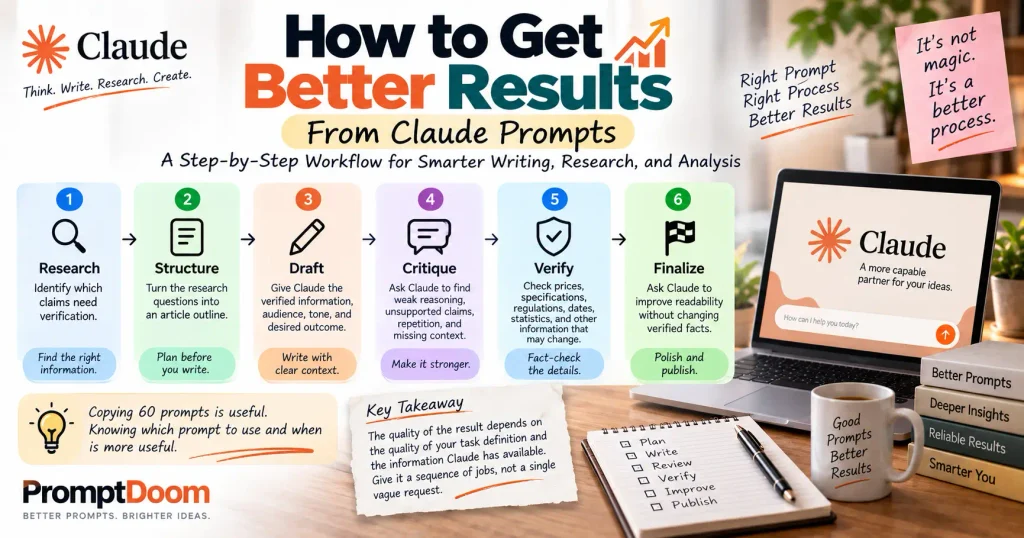
A better workflow is:
Research → Structure → Draft → Critique → Verify → Finalize
For example, suppose you’re writing an article about whether electric vehicles make financial sense for an Indian commuter.
Don’t begin with:
Write me an article about EVs.
Instead, break the job into stages.
Step 1: Research
Identify which claims need verification.
Step 2: Structure
Turn the research questions into an article outline.
Step 3: Draft
Give Claude the verified information, audience, tone, and desired outcome.
Step 4: Critique
Ask Claude to find weak reasoning, unsupported claims, repetition, and missing context.
Step 5: Verify
Check prices, specifications, regulations, dates, statistics, and other information that may change.
Step 6: Finalize
Ask Claude to improve readability without changing verified facts.
The important distinction is that Claude isn’t being asked to magically know everything at once.
You’re giving it a sequence of jobs.
Three Prompt Upgrades That Make a Big Difference
1. Give Claude context, not just commands
Weak:
Write a product review.
Better:
Write a 1,200-word product review for first-time buyers who are deciding between this product and two competing models. Focus on practical ownership rather than repeating manufacturer specifications.
The second prompt tells Claude who the reader is and what decision they are making.
2. Tell Claude what not to do
Constraints can be just as useful as instructions.
For example:
Do not invent statistics.
Do not assume the cheapest option is automatically the best.
Do not repeat the manufacturer’s marketing language as fact.
Flag information that may have changed recently.
That reduces the space for low-value filler and unsupported claims.
3. Ask for criticism before the final answer
Instead of:
Write the final article.
Try:
Draft the article, then critically review it for unsupported claims, repetition, missing context, weak examples, and unanswered reader questions. Revise the draft based on that review and return the final version.
For complex work, this can be more useful than simply adding more instructions to the original prompt.
Claude Projects: A Better Way to Handle Recurring Work
If you repeatedly work on the same subject, don’t treat every Claude conversation as a blank slate.
Claude Projects provide dedicated workspaces where you can maintain project knowledge, documents, chat history, and project-specific instructions.
For a content operation, you could maintain a Project containing:
- Brand style guide
- Editorial guidelines
- Previously published articles
- Product documentation
- Research notes
- Approved terminology
- Target audience information
- Internal linking rules
- Fact-checking standards
A reusable Project instruction could say:
You are the editorial research assistant for [WEBSITE]. Use the supplied reference material as the primary source of truth. Preserve our editorial tone, avoid unsupported claims, distinguish facts from interpretation, and flag information that appears outdated. Do not invent sources, statistics, quotes, or firsthand experiences.
This turns prompting from a one-off exercise into a repeatable editorial workflow.
Claude Research vs Ordinary Prompts: Which Should You Use?
Not every research task needs Claude’s Research mode.
Anthropic’s current guidance distinguishes between ordinary web search for relatively straightforward factual questions and Research for more complex investigations that require multiple searches and deeper exploration.
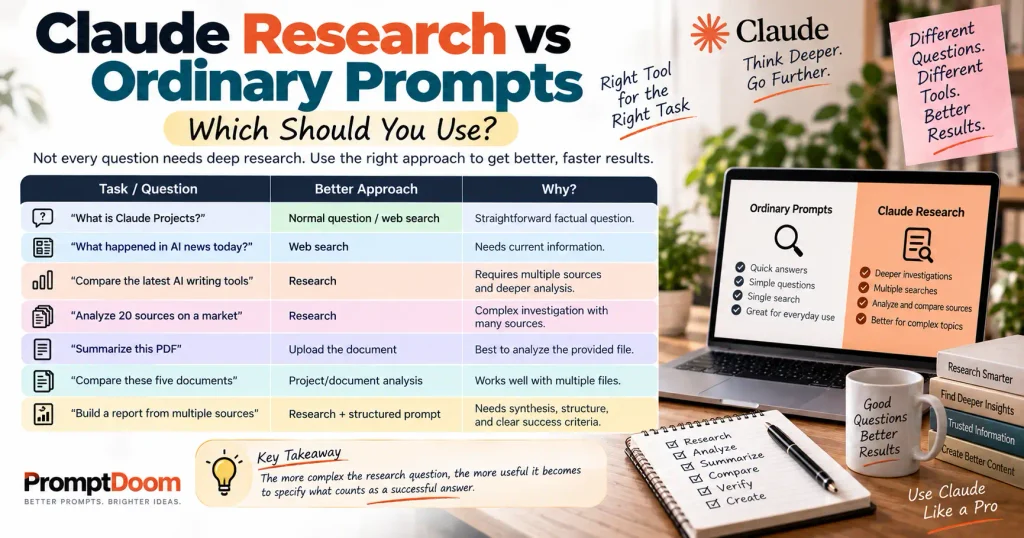
A simple way to think about it:
| Task | Better approach |
|---|---|
| “What is Claude Projects?” | Normal question / web search |
| “What happened in AI news today?” | Web search |
| “Compare the latest AI writing tools” | Research |
| “Analyze 20 sources on a market” | Research |
| “Summarize this PDF” | Upload the document |
| “Compare these five documents” | Project/document analysis |
| “Build a report from multiple sources” | Research + structured prompt |
The more complex the research question, the more useful it becomes to specify what counts as a successful answer.
How Claude Artifacts Fit Into a Writing Workflow
Claude’s Artifacts feature is useful when the output needs to become a substantial standalone work product rather than remain as ordinary chat text.
Anthropic describes Artifacts as a dedicated workspace for substantial content such as documents, code, visualizations, tools, and interactive experiences.
For example, instead of asking:
Give me some ideas for a content calendar.
You could ask:
Create a 12-month editorial calendar for a technology website.

Include:
- Month
- Topic
- Primary keyword
- Search intent
- Content type
- Suggested title
- Target audience
- Publishing priority

Organize the result as a reusable table that I can edit.
Claude can also create and edit files such as spreadsheets, PowerPoint presentations, Word documents, and PDFs through its file-creation capabilities.
That makes the prompt more valuable when you define not just the content, but the deliverable.
The Simple Claude Prompt Formula
For everyday work, remember:
ROLE + TASK + CONTEXT + CONSTRAINTS + OUTPUT
For example:
Role: You are an experienced technology journalist.
Task: Compare Claude, ChatGPT, Gemini, and DeepSeek for content creators.
Context: The audience consists of Indian freelancers and small-business owners choosing an AI assistant.
Constraints: Use current information, avoid unsupported benchmark claims, and distinguish free from paid capabilities.
Output: Start with a quick verdict, followed by a comparison table, detailed analysis, use-case recommendations, and FAQ.
That’s enough structure to turn a vague request into a meaningful assignment.
Common Mistakes When Writing Claude Prompts
Mistake 1: Being too vague
Bad:
Write something about SEO.
Better:
Explain how a small Indian ecommerce business can build an SEO content strategy with a limited budget. Focus on keyword selection, search intent, topical coverage, internal linking, and measurement. Include a realistic example.
Mistake 2: Asking for unsupported certainty
Bad:
Tell me which AI is objectively the best.
There may not be one objective answer.
Better:
Compare these AI assistants across writing, research, coding, multimodal work, ease of use, and price. Explain which is the strongest choice for different user profiles.
Mistake 3: Asking Claude to invent expertise
Avoid prompts such as:
Pretend you personally tested all these products.
That creates false firsthand authority.
Instead:
Analyze the products using the supplied specifications, documentation, reviews, and other cited evidence. Clearly distinguish documented capabilities from subjective assessments.
Mistake 4: Making the prompt unnecessarily huge
A 2,000-word prompt isn’t automatically better than a 200-word prompt.
The goal is clear instructions, not maximum instructions.
Remove anything that does not affect the desired result.
Mistake 5: Treating repeated information as stronger evidence
If ten websites copy the same original statistic, that doesn’t mean there are ten independent confirmations.
When researching with Claude, ask it to trace important claims back toward authoritative or primary sources where possible.
A Reusable Master Prompt for Claude Writers
If you regularly produce articles, you can combine the ideas above into one reusable framework:
You are an expert writer and research assistant specializing in [NICHE].

Your task is to create accurate, useful, publication-ready content for [WEBSITE/AUDIENCE].

For every assignment:

1. Understand the reader's actual search intent or problem.
2. Identify the information they need most.
3. Separate facts from interpretation.
4. Do not invent statistics, quotes, sources, experiences, or case studies.
5. Flag information that may be outdated or requires verification.
6. Prefer specific examples over generic explanations.
7. Avoid keyword stuffing and formulaic AI language.
8. Use clear headings and logical structure.
9. Address important limitations and exceptions.
10. Prioritize usefulness over word count.

Before finalizing:
- Check whether the main question has been answered.
- Remove repetition.
- Identify unsupported claims.
- Look for missing context.
- Improve weak examples.
- Make sure the final answer follows the requested format.

Assignment:

Topic: [TOPIC]
Audience: [AUDIENCE]
Primary keyword: [KEYWORD]
Secondary keywords: [KEYWORDS]
Search intent: [INTENT]
Desired length: [LENGTH]
Tone: [TONE]
Output format: [FORMAT]
Special requirements: [REQUIREMENTS]
This is deliberately modular. You can change the variables without rebuilding your entire prompt each time.
Final Takeaway: Better Claude Prompts Start With Better Thinking
The best Claude prompts aren’t necessarily the longest ones.
They’re the ones that make the job unmistakably clear.
Tell Claude what you’re trying to accomplish, who the result is for, what information it should use, what standards it must follow, and what a successful answer looks like.
For writing, that means moving beyond:
“Write an article about X.”
For research, it means moving beyond:
“Research X.”
For serious work, give Claude a process:
Define the question → gather evidence → organize it → produce a draft → challenge the draft → verify important claims → finalize.
That approach is more reliable than searching for a single “perfect prompt.”
Claude’s current toolset also makes this workflow more flexible than a basic chatbot interaction. Projects can maintain reusable knowledge and instructions; Research can conduct multi-step web research; Artifacts can turn substantial outputs into standalone work products; and Claude can create and edit files directly.
So use these 60 Claude prompts as starting points, not magic spells.
The strongest prompt is usually the one you adapt to the actual problem sitting in front of you.
Frequently Asked Questions
What are the best Claude prompts for writing?
The most useful Claude writing prompts usually provide the topic, audience, purpose, tone, constraints, and desired structure. Prompts for outlining, drafting, editing, critique, and fact-checking are generally more useful than a single generic “write an article” prompt.
What are the best Claude prompts for research?
Research prompts should define the research question, evidence requirements, source preferences, scope, and uncertainty rules. For complex research, ask Claude to compare sources, identify contradictions, verify claims, and distinguish evidence from interpretation.
Can Claude research information from the web?
Yes. Claude supports web search, and its Research feature can conduct multi-step searches and return findings with citations. Anthropic recommends web search for straightforward current-information queries and Research for more complex investigations.
Can I use these prompts in Claude Projects?
Yes. Projects let you maintain a dedicated knowledge base and project instructions, making them particularly useful for recurring writing and research workflows.
Are longer Claude prompts better?
Not necessarily. A concise prompt with clear context, constraints, and success criteria can outperform a much longer prompt containing unnecessary or conflicting instructions.
Should I ask Claude to fact-check its own work?
You can, and it can be a useful quality-control step. But self-review should not replace independent verification of important claims, especially statistics, prices, regulations, medical information, financial information, or rapidly changing product capabilities.
Can Claude create documents from prompts?
Yes. Claude currently supports file creation and editing, including formats such as Word documents, spreadsheets, PowerPoint presentations, and PDFs, depending on the available capabilities and environment.