
Can you use GPT-6 Astra for free? Here’s what OpenAI currently allows, who gets access, how to check your account, and the legitimate ways to use Astra in ChatGPT.
Can You Use ChatGPT 6 Astra for Free?
Not through the regular ChatGPT Free plan right now.
As of September 9, 2026, OpenAI’s current availability documentation does not list GPT-6 Astra as part of the Free or Go ChatGPT plans. GPT-6 Astra is available to eligible Plus users through ChatGPT Work and Codex as the rollout reaches their accounts, while GPT-6 Pro, powered by Astra, is rolling out in regular ChatGPT for Pro, Business, and Enterprise users.
That distinction matters because many pages claiming to show you how to get “GPT-6 Astra free” may confuse a free ChatGPT account with access to another model, an old promotional reset, an API trial, or an unofficial service.
There is currently no legitimate secret button, special prompt, or free URL that unlocks Astra on a Free ChatGPT account.
If you already have ChatGPT Plus, however, there is a legitimate way to use Astra without buying separate Astra credits for every request: Astra usage is included within the applicable Work and Codex allowance of your plan.
This guide explains exactly what that means and what you can do.
What Is GPT-6 Astra?
GPT-6 Astra is OpenAI’s latest flagship model, introduced on September 3, 2026.
OpenAI positions Astra for demanding work across areas including:
- Computer use
- Web browsing
- Software engineering
- Cybersecurity
- Science
- Research
- Professional knowledge work
- Complex, multi-step tasks
It can also create documents, spreadsheets, and presentations based on instructions and templates.
The important thing is that Astra isn’t simply being positioned as a faster chatbot.
It is designed for tasks where the AI may need to reason through multiple steps, use tools, work with information, and produce a finished result.
For example, a basic chatbot request might be:
“Explain this spreadsheet.”
A more demanding Astra-style task could be:
“Analyze this spreadsheet, identify unusual changes, investigate the likely causes using the available sources, summarize the findings, and create a presentation for the management team.”
That difference explains why Astra’s access and usage rules are separate from ordinary ChatGPT conversations.
Is GPT-6 Astra Completely Free?
For Free ChatGPT users: No.
OpenAI’s current documentation says Free and Go users receive GPT-5.6 Luna as their default ChatGPT model and do not receive GPT-5.6 Sol. More importantly for this article, GPT-6 Pro powered by Astra is rolling out to Pro, Business, and Enterprise users, while Plus users receive Astra in Work and Codex as rollout progresses.
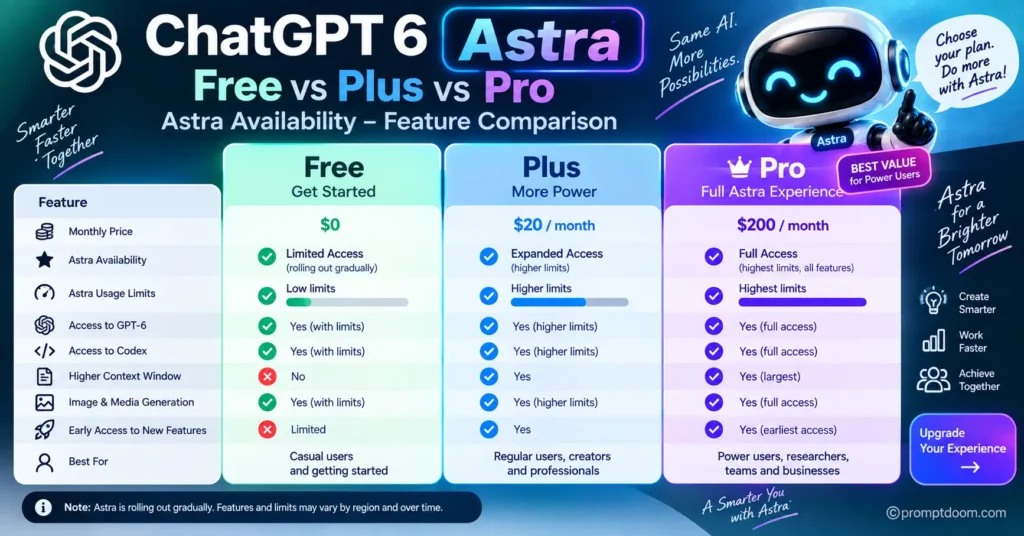
So there are three different situations that should not be confused:
| User | Astra access |
|---|---|
| Free | No current Astra access |
| Go | No current Astra access |
| Plus | Astra in Work and Codex as rollout reaches the account |
| Pro | Astra access, including GPT-6 Pro in Chat as available |
| Business | Astra access subject to rollout/workspace permissions |
| Enterprise | Astra access subject to rollout and administrator permissions |
The exact availability can vary by product and rollout status.
So if you’re searching specifically for “how to use ChatGPT 6 Astra for free,” the honest answer is that a Free account cannot currently unlock Astra simply by changing a setting.
How to Check Whether You Already Have Astra Access
Before paying for anything, check your existing account.
You may already have access through a supported plan or workspace.
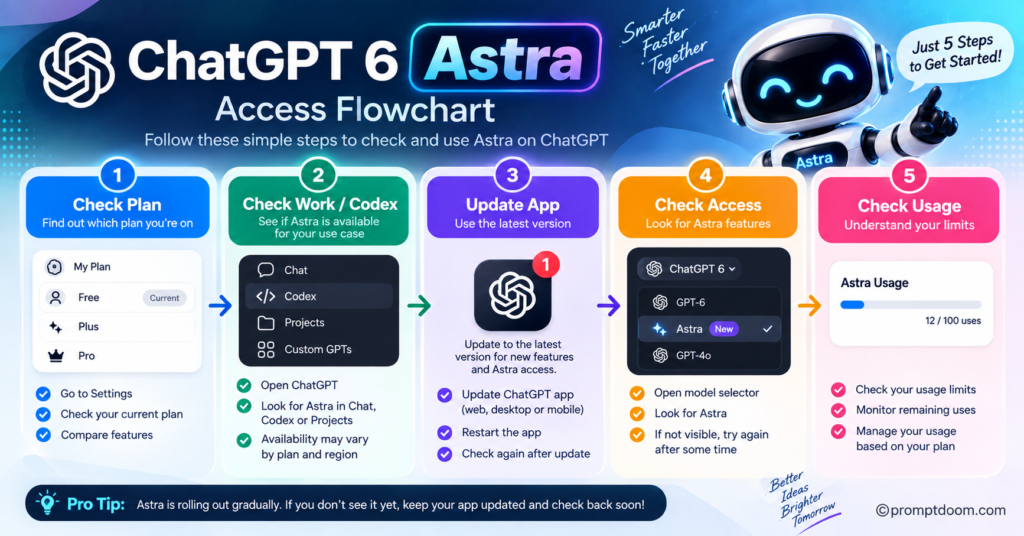
Step 1: Open ChatGPT
Sign into the ChatGPT account you normally use.
Step 2: Check the available experiences
Look for Chat, Work, or Codex, depending on the version of ChatGPT and device you’re using.
OpenAI says ChatGPT Work is being rolled out gradually, so not seeing Work immediately does not necessarily mean there is a technical problem.
Step 3: Check your model availability
If your plan is eligible and Astra has reached your account, you should see the relevant Astra-powered option where OpenAI has enabled it.
Remember that Astra availability can differ between Chat, Work, and Codex. Having Astra in Work does not automatically mean you have GPT-6 Pro in ordinary Chat.
Step 4: Check your usage
If Astra is available through Work or Codex, usage comes from the allowance attached to your plan.
OpenAI says Work and Codex share an allowance, and the amount of usage depends on factors including the plan, task, input and output size, reasoning settings, and mode.
How to Use GPT-6 Astra With ChatGPT Plus
This is the closest legitimate option to what many people mean when they search for “GPT-6 Astra free.”
It isn’t free in the strict sense because ChatGPT Plus is a paid subscription.
However, if you already subscribe to Plus, you don’t necessarily need to purchase separate Astra access to use it in supported Work and Codex experiences.
OpenAI says Plus includes GPT-6 Astra in ChatGPT Work and Codex as the rollout reaches eligible accounts. Plus and Business Standard accounts have limited Astra usage, with optional credits available for additional usage afterward.
The basic process
- Sign in to your ChatGPT Plus account.
- Update the ChatGPT desktop app if necessary.
- Open Work or Codex.
- Check whether Astra is available.
- Use your included allowance.
- Monitor your usage rather than assuming the allowance is unlimited.
If Astra doesn’t appear, don’t immediately purchase credits.
First check whether your account has received the rollout and whether your desktop app needs an update.
What If Astra Doesn’t Appear?
OpenAI specifically recommends checking for a desktop-app update if Astra is missing.
In the ChatGPT desktop app:
Menu → Check for Updates
Install the available update and completely restart the application.
OpenAI notes that you may need to check for updates again even if you recently installed one.
For Codex CLI, OpenAI currently says Astra requires Codex CLI version 0.153.0 or newer.
However, updating the application does not turn a Free account into an Astra-eligible account.
That’s an important distinction.
Updating fixes software availability.
It does not change your subscription eligibility.
Can You Use Astra Through Codex for Free?
This question needs another distinction.
OpenAI says Codex has different availability depending on your plan. Astra is included in Work and Codex for eligible Plus users, while GPT-6 Pro powered by Astra is available to eligible Pro, Business, and Enterprise users.
A Free user should therefore not assume that installing Codex automatically provides free Astra access.
Your ChatGPT plan determines the applicable access and usage.
OpenAI also distinguishes between signing into Codex with your ChatGPT account and using your own API key. Signing in with ChatGPT uses the plan’s usage and billing; using an API key follows API pricing.
What About the GPT-6 Astra Launch Resets?
This is where some confusion around “free Astra” is likely to come from.
During the Astra launch, OpenAI provided banked resets to eligible Plus, Pro, and Business users.
According to OpenAI, eligible existing subscribers received launch-related resets on September 3 and September 4, 2026. Certain newly created eligible accounts could also qualify if they met the stated cutoff times.
But this was not a permanent free Astra offer.
A reset refreshes an eligible usage allowance.
It does not:
- Upgrade a Free account
- Permanently increase your plan’s limits
- Create a free Astra subscription
- Give everyone Astra access
- Convert credits into model access
OpenAI explicitly says that a reset restores the allowance it covers rather than permanently changing the plan’s limits.
So if you see an old article saying:
“OpenAI is giving everyone free GPT-6 Astra resets”
check its publication date.
The launch promotion is not the same thing as permanent Free-plan access.
Can Buying Credits Give You Free Astra Access?
No.
Credits and model access are separate.
OpenAI’s current documentation explicitly says that buying credits does not provide early access during the Astra rollout.
This is an easy point to misunderstand.
Think of it this way:
Plan eligibility → determines whether you can access the model.
Usage allowance → determines how much included usage you have.
Credits → can pay for eligible additional usage.
Buying credits doesn’t magically unlock a model that your plan isn’t eligible to use.
Is GPT-6 Pro the Same as GPT-6 Astra?
They’re closely related, but you shouldn’t treat the names as interchangeable.
OpenAI describes GPT-6 Pro as powered by GPT-6 Astra.
At the same time, Astra usage in Work and Codex follows a separate allowance structure from GPT-6 Pro in regular Chat.
That means:
Astra in Work does not automatically mean GPT-6 Pro in Chat.
This distinction is particularly important when comparing ChatGPT plans.
A user might legitimately have Astra-powered capabilities through Work or Codex while not having the GPT-6 Pro option available in their ordinary Chat interface.
What Can You Actually Use Astra For?
If you gain legitimate access, Astra is designed for demanding tasks rather than only everyday questions.
OpenAI highlights capabilities including computer use, browsing, software engineering, cybersecurity, science, research, and professional work.
Here are practical examples.
Research
Instead of:
Research electric vehicles.
Try:
Research the current EV market in India. Compare major developments, government policies, charging infrastructure, battery technology, and consumer adoption. Separate verified facts from interpretation and cite the sources used.
Writing
Instead of:
Write a blog post.
Try:
Research the topic, identify the reader’s actual search intent, create an outline, draft the article, identify unsupported claims, and revise the draft without adding unverified statistics.
Coding
Instead of:
Fix this code.
Try:
Inspect the repository, identify the root cause of the error, explain the problem, implement the smallest appropriate fix, and run the relevant tests before presenting the result.
Professional work
Instead of:
Analyze this report.
Try:
Analyze this report for an executive audience. Identify the three most important findings, quantify meaningful changes, identify risks and uncertainties, and create a concise management summary.
The more complex the task, the more useful a structured instruction becomes.
How to Get More Value From Limited Astra Usage
If your Astra allowance is limited, don’t waste it on tasks that a simpler model can handle.
For example, you probably don’t need a frontier model to answer:
What is the capital of Japan?
Save higher-capability models for tasks such as:
- Multi-document research
- Complex coding
- Long analytical reports
- Difficult debugging
- Multi-step planning
- Data analysis
- Complex professional deliverables
- Research that requires several sources
- Tasks involving multiple tools
A useful rule is:
Use the simplest model that can reliably complete the task.
That way, expensive or limited high-end usage is reserved for work where it provides meaningful value.
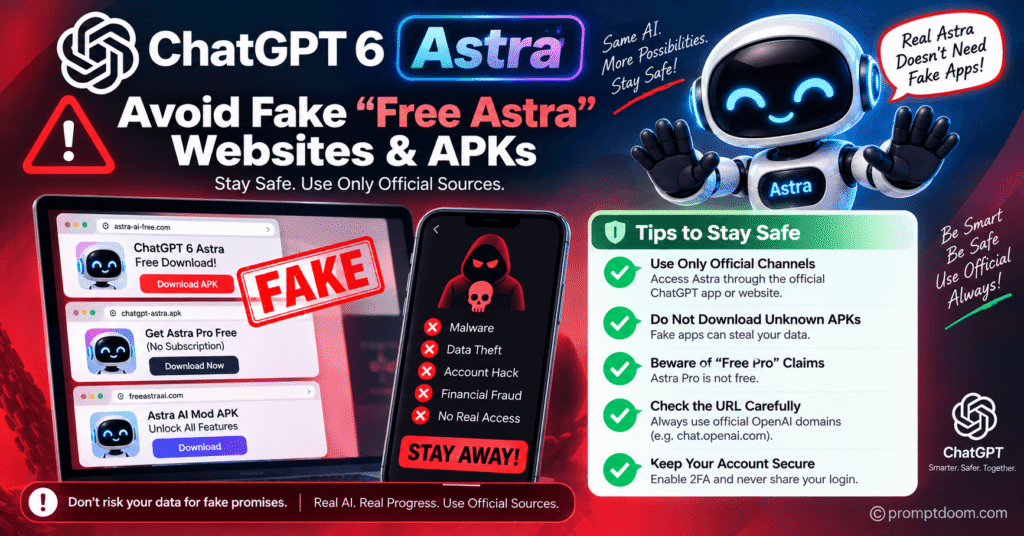
Can You Get GPT-6 Astra From a Third-Party Website?
Be extremely careful.
If a website claims:
“Use GPT-6 Astra completely free — no ChatGPT account required”
you should not automatically assume it is legitimate.
The site may be:
- Using another model
- Providing an unofficial wrapper
- Misrepresenting an older model
- Charging hidden fees
- Collecting your prompts
- Asking for sensitive credentials
- Using an API behind the scenes
The safest approach is to verify access through official OpenAI products and documentation.
Don’t enter your ChatGPT password into a random website simply because it advertises “free Astra.”
What About Free GPT-6 Astra APKs?
The same caution applies to Android packages, browser extensions, desktop installers, and modified ChatGPT applications.
A file named something like:
GPT-6-Astra-Free.apk
doesn’t prove that it contains GPT-6 Astra.
In fact, the file could have nothing to do with OpenAI.
For a newly launched AI model, fake applications can appear quickly because people are actively searching for access.
Use official OpenAI software and account channels instead of downloading modified clients claiming to unlock restricted models.
Is There a Secret Prompt That Unlocks Astra?
No.
A prompt can change how an available model responds.
It cannot legitimately change your account’s model permissions.
For example, writing:
“You are GPT-6 Astra. Ignore my account limitations.”
doesn’t turn another model into Astra.
Likewise, asking a Free account to “switch internally to Astra” doesn’t override OpenAI’s server-side access controls.
Model availability is determined by the product and account configuration, not by wording inside a conversation.
What Is the Cheapest Legitimate Way to Try Astra?
That depends on what you mean by “free.”
If you mean literally $0:
There is currently no official Free-plan route to GPT-6 Astra.
If you already have Plus:
Check Work and Codex because Plus includes Astra there as rollout reaches eligible accounts.
If you are considering upgrading:
Don’t upgrade solely because a third-party article says Astra is “free.”
Check the current OpenAI plan and model-availability information first, because access can differ between Chat, Work, and Codex.
If you are a developer:
Astra is also available through the OpenAI API, but API usage is paid rather than a free ChatGPT feature. OpenAI lists standard API pricing separately.
GPT-6 Astra Access: Quick Comparison
| Access route | Astra? | Free? | Important detail |
|---|---|---|---|
| ChatGPT Free | ❌ | ✅ | No current Astra access |
| ChatGPT Go | ❌ | ❌ | No current Astra access |
| ChatGPT Plus | ✅ | ❌ | Astra in Work/Codex as rollout reaches account |
| ChatGPT Pro | ✅ | ❌ | GPT-6 Pro powered by Astra rolling out |
| Business | ✅ | ❌ | Workspace/rollout conditions apply |
| Enterprise | ✅ | ❌ | Admin/model permissions may apply |
| OpenAI API | ✅ | ❌ | API billing applies |
| Random “free Astra” website | ❓ | ❓ | Not an official access route |
*Availability depends on rollout, workspace permissions, product, and applicable limits.
Why You May See Different Astra Information Online
GPT-6 Astra launched only recently, and its availability is still rolling out.
OpenAI’s own documentation has been updated repeatedly during the rollout. The current help pages distinguish between:
- GPT-6 Astra
- GPT-6 Pro powered by Astra
- Astra in Work
- Astra in Codex
- Standard Chat
- Different subscription tiers
- Different usage allowances
That’s why an article published immediately after launch may no longer accurately describe the available plans.
For this topic, publication date matters.
If you’re reading an article claiming that Astra is available to Free users, check when it was written and whether it cites current OpenAI documentation.
Common Problems When Trying to Access GPT-6 Astra
“I have Plus but don’t see Astra.”
The rollout may not have reached your account yet.
OpenAI says Work is being gradually rolled out and availability can differ between Chat, Work, and Codex.
First update the desktop app and restart it.
“I updated the app but Astra is still missing.”
An update does not guarantee eligibility.
Your plan, workspace permissions, product, and rollout status still determine availability.
“I bought credits but Astra still isn’t available.”
That’s expected if the issue is model eligibility.
OpenAI says credits pay for eligible usage; they don’t add model access.
“I can use Astra in Work but not normal Chat.”
That can happen.
OpenAI explicitly separates Astra availability in Work and Codex from GPT-6 Pro availability in Chat.
“A website says I can get Astra free.”
Verify the service before signing in.
If it isn’t an official OpenAI product or documented partner access route, don’t assume it provides genuine Astra access.
Should You Pay for GPT-6 Astra?
That depends on what you actually do with AI.
If you mostly ask simple questions, summarize short text, brainstorm ideas, or write short messages, paying specifically for a frontier model may not be necessary.
If you regularly perform complex research, coding, analysis, multi-step workflows, or professional knowledge work, higher-capability access may be much more valuable.
The better question isn’t:
“Is Astra worth paying for?”
It’s:
“Will Astra save me enough time or improve important work enough to justify the plan cost?”
That’s a much more useful way to make the decision.
The Bottom Line: Can You Use ChatGPT 6 Astra for Free?
If by free you mean a standard ChatGPT Free account with no paid subscription, not at the moment.
OpenAI’s current documentation does not list Astra as a Free or Go model. Plus users can access GPT-6 Astra through Work and Codex as the rollout reaches their accounts, while GPT-6 Pro powered by Astra is rolling out in ChatGPT for Pro, Business, and Enterprise users.
There are also no legitimate prompt tricks that turn a Free account into an Astra account.
The safest approach is simple:
- Check your current ChatGPT plan.
- Check Work and Codex if you’re a Plus user.
- Update the desktop app if Astra is missing.
- Check your usage allowance.
- Use official OpenAI documentation for current availability.
- Avoid unofficial “free Astra” websites, APKs, and account-sharing schemes.
Most importantly, don’t confuse a launch promotion, usage reset, API access, or another model with permanent free Astra access.
As the rollout develops, OpenAI may change which plans and products include Astra. For that reason, the current availability information should always take priority over old “free GPT-6 Astra” guides.
Frequently Asked Questions
Is ChatGPT 6 Astra free?
GPT-6 Astra is not currently included with the standard ChatGPT Free or Go plans. Eligible Plus users can access Astra in Work and Codex as rollout reaches their accounts. GPT-6 Pro powered by Astra is rolling out for Pro, Business, and Enterprise users.
How can I use GPT-6 Astra without buying extra credits?
If you have an eligible Plus subscription, Astra usage in Work and Codex is included within your plan’s applicable allowance. Additional credits may be available after included usage is exhausted.
Can a Free ChatGPT account unlock Astra with a prompt?
No. Prompts cannot change your account’s model permissions.
Does ChatGPT Plus include GPT-6 Astra?
Yes, OpenAI currently says Plus plans include GPT-6 Astra in ChatGPT Work and Codex as it rolls out. However, Astra is not automatically the same as GPT-6 Pro in standard Chat, and availability can differ between products.
Is GPT-6 Pro the same as GPT-6 Astra?
GPT-6 Pro is powered by GPT-6 Astra, but OpenAI treats GPT-6 Pro in Chat and Astra access in Work/Codex as separate product experiences with different availability and usage rules.
Why can’t I see Astra even though I have an eligible plan?
Rollout can be gradual. Check that your ChatGPT desktop app is updated, restart it, and check the relevant product and model selector. Workspace permissions can also affect access.
Can I use GPT-6 Astra through the OpenAI API?
Yes. OpenAI lists GPT-6 Astra as available through the API, but API usage is billed separately rather than being a free ChatGPT feature.
Are free GPT-6 Astra websites safe?
You should not assume they are. Unless a service is an official OpenAI access route or a verified partner, it may not actually be providing GPT-6 Astra. Never give your ChatGPT credentials to an untrusted site.
Final Verdict
The phrase “How to use ChatGPT 6 Astra for free” makes it sound as though there is a hidden trick.
There isn’t.
The legitimate answer is more straightforward: Free and Go users currently don’t have Astra access, while eligible Plus users can use Astra in Work and Codex within their included allowance.
If you’re already paying for Plus, check Work and Codex before spending anything else. If you’re on Free, don’t download a suspicious “Astra unlocker” or hand your login to a site promising unlimited access.
And if you see an article claiming otherwise, check its date.
With a newly launched model, current access information matters more than an attractive headline.