ChatGPT Prompts for Analyzing Competitor Websites (What Actually Works in 2026)
A common first move when researching a competitor is to paste their homepage URL into ChatGPT and ask it to analyze the site. The response often reads confidently — clean paragraphs, a tidy SWOT breakdown, specific-sounding observations about messaging and positioning. The problem is that confidence and accuracy aren’t the same thing. Depending on the setup being used, ChatGPT may not actually be able to access the live page at all, and a model that can’t see the real content will sometimes generate a plausible-sounding analysis based on general knowledge of the industry rather than what’s actually on the page.
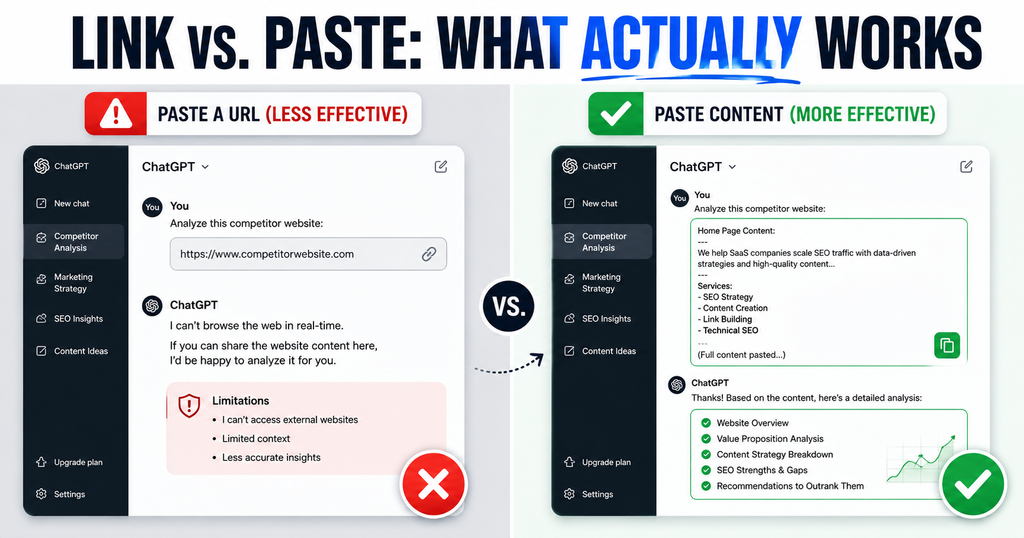
This matters more for competitor analysis than almost any other ChatGPT use case, because the entire value of the exercise depends on the observations being tied to something real. A generic-sounding analysis of a competitor’s “clean design” and “clear value proposition” is worthless if it wasn’t actually looking at their site. The fix isn’t a smarter prompt — it’s changing how the content gets in front of ChatGPT in the first place.
The Limitation Most Guides Skip: Can ChatGPT Actually See the Website?
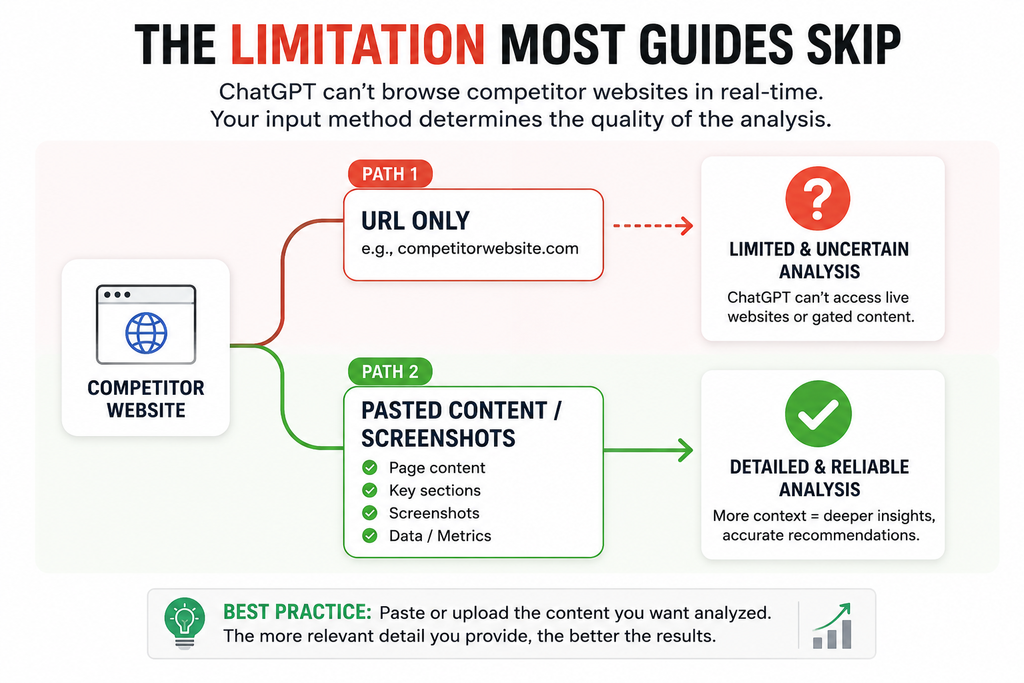
Whether ChatGPT can access a live webpage depends on the specific model and browsing setup in use, and this changes over time as tools update — which is exactly why relying on it silently is risky. The more reliable approach, regardless of which version you’re using, is to give ChatGPT the actual content yourself: paste the page’s copy directly into the chat, take screenshots of key pages and upload them, or export data from a tool you already use (Ahrefs, SEMrush, SimilarWeb, or even a manual read-through) and paste that in. This removes the guesswork entirely — you know exactly what ChatGPT is analyzing, because you gave it to them directly.
The prompts below are written with this workflow in mind: gather the real content first, then prompt ChatGPT to analyze it, rather than assuming a URL alone will produce a grounded answer.
Prompts for Analyzing Messaging and Positioning
Prompt: “Here is the homepage copy, about page copy, and main product page copy from [competitor name]’s website: [paste content]. Analyze their core value proposition, how they position themselves against alternatives, and the primary emotional or practical appeal their messaging is built around.”
Pasting the actual copy rather than just the URL means the analysis is grounded in real sentences the competitor chose to write, which produces far more specific and useful output than a general “what’s their positioning” question.
Prompts for Comparing Multiple Competitors at Once
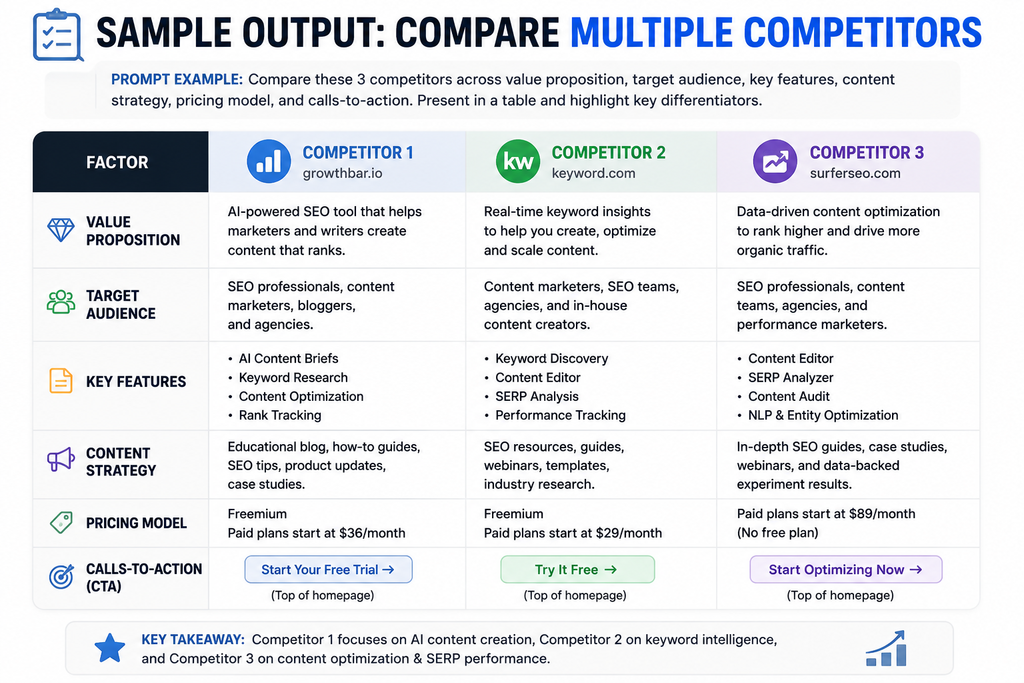
Prompt: “Here is homepage and product page copy from three competitors: [Competitor A content], [Competitor B content], [Competitor C content]. Create a table comparing their core value proposition, target audience signals, and primary calls-to-action, so I can see how they differentiate from each other.”
A table format forces a side-by-side structure that’s far easier to scan than three separate paragraph analyses, and it makes gaps — a positioning angle none of the three competitors are using — much easier to spot at a glance.
Prompts for UX and Conversion Element Analysis
Prompt: “Here are screenshots of [competitor name]’s homepage, pricing page, and checkout/signup flow: [upload images]. Analyze the conversion elements they’re using — calls-to-action, trust signals, pricing presentation, urgency or scarcity tactics — and note anything that seems intentionally designed to reduce buyer hesitation.”
Screenshots work well for this category specifically because layout, visual hierarchy, and button placement are difficult to convey through pasted text alone, and ChatGPT’s ability to analyze uploaded images means this category doesn’t require a browsing-enabled setup at all.
Prompts for Content Gap Analysis
Prompt: “Here is a list of blog post titles and topics from [competitor name]’s site: [paste list]. Compare this against my own list of content: [paste your list]. Identify topics they’re covering that I’m not, and topics I’m covering that they’re missing, so I can see where there’s a genuine content gap worth filling.”
This prompt works well fed from a simple manual list (copied from a competitor’s blog index page) rather than requiring a paid SEO tool, though pasting an exported keyword report from a tool you already use will sharpen the analysis further.
Prompts for Pricing and Offer Comparison
Prompt: “Here is the pricing page content from [competitor name]: [paste content]. Compare it to my own pricing: [paste your pricing]. Identify where I’m priced higher or lower, what’s included at each tier relative to theirs, and any gaps in my offer that their pricing structure highlights.”
Pricing pages change frequently and are exactly the kind of page where an outdated or hallucinated answer is most damaging, since a wrong assumption here can lead directly to a bad pricing decision — pasting the actual current page content avoids that risk entirely.
Prompts for Customer Sentiment and Review Analysis
Prompt: “Here are customer reviews for [competitor name] pulled from [review site/app store]: [paste reviews]. Identify the most common complaints, the most common praise, and anything customers say they wish the product did differently.”
This is one of the more reliable ChatGPT competitor-analysis use cases regardless of browsing setup, since review text is something you can copy and paste directly in full, removing any dependency on live web access.
A Worked Example: Prompt Paired With Real Content
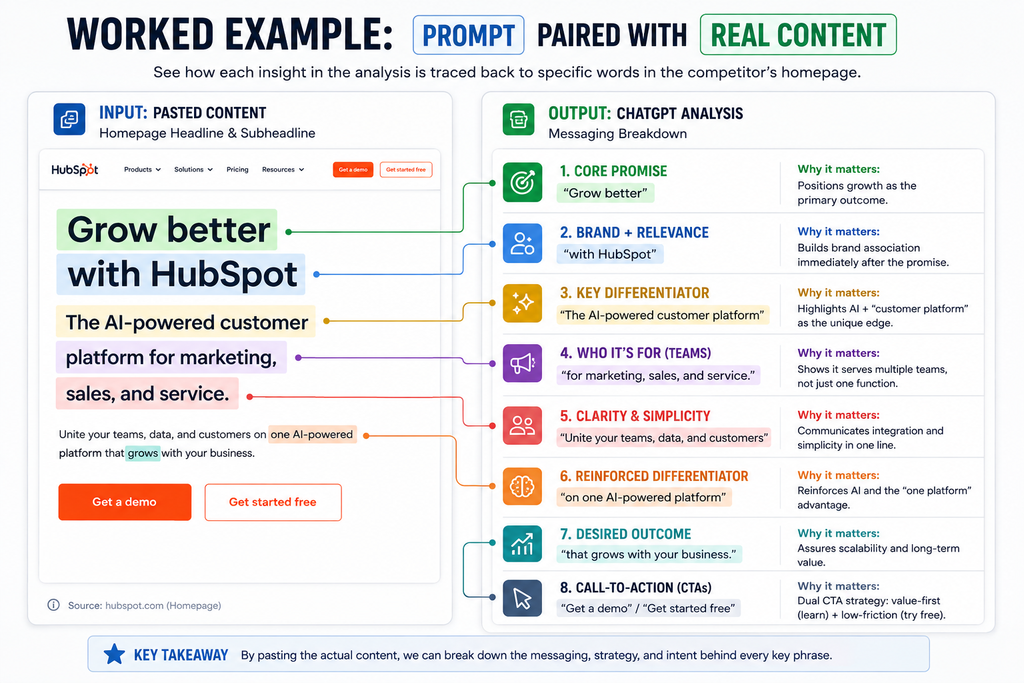
Content pasted: A competitor’s homepage headline and subheadline: “The all-in-one platform for freelance creatives. Manage clients, send invoices, and get paid faster — all in one place, without the learning curve of enterprise software.”
Prompt used: “Here is a competitor’s homepage headline and subheadline: [pasted above]. Analyze their value proposition and identify the specific customer pain point this messaging is designed to address.”
Resulting analysis: The messaging targets freelance creatives specifically rather than businesses broadly, signaling a deliberate choice to avoid competing directly with enterprise-focused tools. The phrase “without the learning curve of enterprise software” directly addresses a likely pain point — freelancers who’ve tried more complex business tools and found them overbuilt for their needs. The “all-in-one” framing suggests they’re positioning against a stack of separate tools (invoicing app, client CRM, payment processor) rather than against a single direct competitor.
Every observation in that analysis traces directly back to a specific phrase in the pasted content — nothing was inferred from general industry knowledge, which is exactly the difference this workflow is designed to produce.
What to Do With the Analysis Once You Have It
A competitor analysis that stays in a chat window doesn’t change anything on its own. Once you have observations you trust — because they were grounded in real, pasted content — turn them into specific action items: a positioning angle none of your competitors are using becomes a headline test, a content gap becomes three items on your next month’s editorial calendar, a common customer complaint about a competitor becomes a feature or guarantee you highlight in your own copy. Treating the analysis as an input to a decision, rather than a document to file away, is what makes the exercise worth the time it takes.
What the Evidence Suggests
The recurring theme across guidance on this topic is that ChatGPT’s usefulness for competitor analysis depends almost entirely on the quality and directness of the input it’s given, not on the sophistication of the prompt’s wording. Feeding it real pasted copy, screenshots, or exported data consistently produces specific, verifiable observations. Relying on a bare URL and hoping the model has current, accurate access to the page is the single most common way this kind of analysis goes wrong, and it’s worth checking directly — simply asking ChatGPT whether it can currently access a live page, or when its information about a topic was last updated — before trusting an answer that depends on it.
Frequently Asked Questions
Can ChatGPT actually browse and analyze a live competitor website?
It depends on the specific model and setup being used, and this capability has changed over time, so it’s not something to rely on silently. The more reliable approach is to paste the actual page content, screenshots, or exported data directly into the chat rather than just sharing a URL.
Why did ChatGPT give me a generic-sounding answer about a competitor’s site?
This usually happens when ChatGPT didn’t actually have access to the live page and generated a plausible-sounding answer based on general industry knowledge instead. Pasting the real content directly avoids this problem.
Do I need a paid SEO tool to do competitor analysis with ChatGPT?
No — manually copying homepage copy, blog post titles, or customer reviews works for most of the prompts in this article. A paid tool like Ahrefs or SEMrush can sharpen the analysis further by supplying real traffic and keyword data, but it isn’t required to get started.
How many competitors should I analyze at once?
Three to five direct competitors is typically enough for a useful comparison without the analysis becoming unwieldy. Adding a couple of indirect or aspirational competitors can add broader context without diluting the core comparison.
Can ChatGPT tell me a competitor’s real traffic or revenue numbers?
Not reliably on its own — those figures require data from analytics or estimation tools. ChatGPT is better used to interpret and structure that kind of data once you’ve gathered it, rather than to produce the figures itself.
How often should competitor website analysis be repeated?
A quick monthly check on messaging and content changes, combined with a more thorough quarterly review covering positioning, pricing, and UX, keeps the analysis current without turning it into a constant time sink.