20 Universal ChatGPT Prompt for Writing Blog Posts (That Don’t Sound Like AI)
Search this exact phrase and you’ll get buried in lists — 25 prompts here, 51 there, each one technically usable and none of them actually the “best” one, because a ranked list of fifty things by definition doesn’t have a single best answer. That mismatch matters, because it points to what’s actually changed about this problem. In 2023, the challenge was getting ChatGPT to produce a blog post at all. In 2026, almost everyone can do that in one line — the real problem is that the result sounds like every other AI-generated post on the same topic, and both readers and Google’s own systems have gotten noticeably better at spotting it.
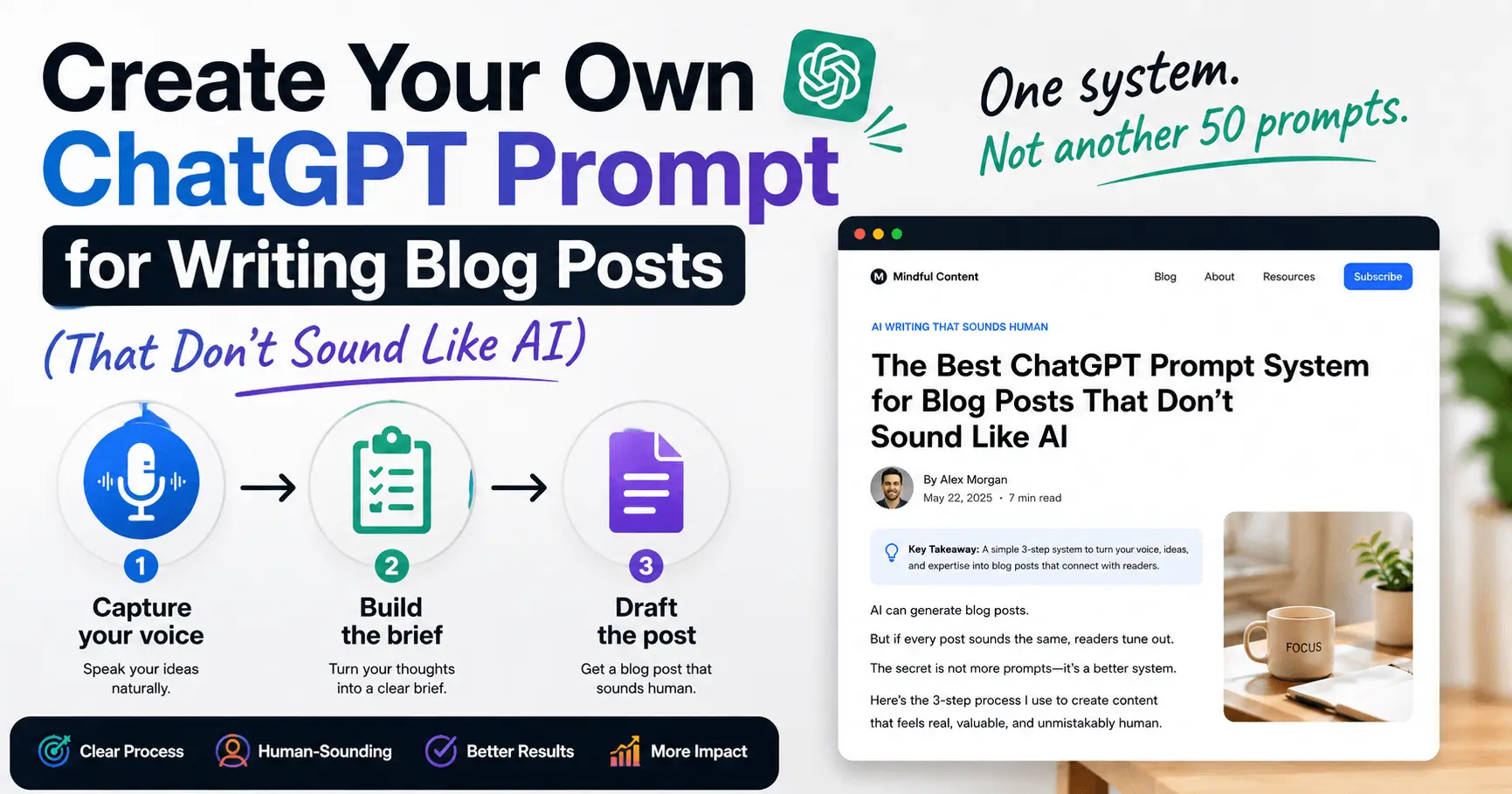
If you’ve typed “write a blog post about [topic]” into ChatGPT recently and gotten back an opener like “In today’s fast-paced world,” a tidy list where every point mirrors the last, or a sentence built around “it’s not just X, it’s Y,” you’ve already run into this. The fix isn’t a better single-line prompt — it’s recognizing that one prompt was never going to solve a three-part problem. What actually works is a short system: capture your voice once, build a real brief every time, then draft against both.
Why the One-Line Prompt Stopped Working
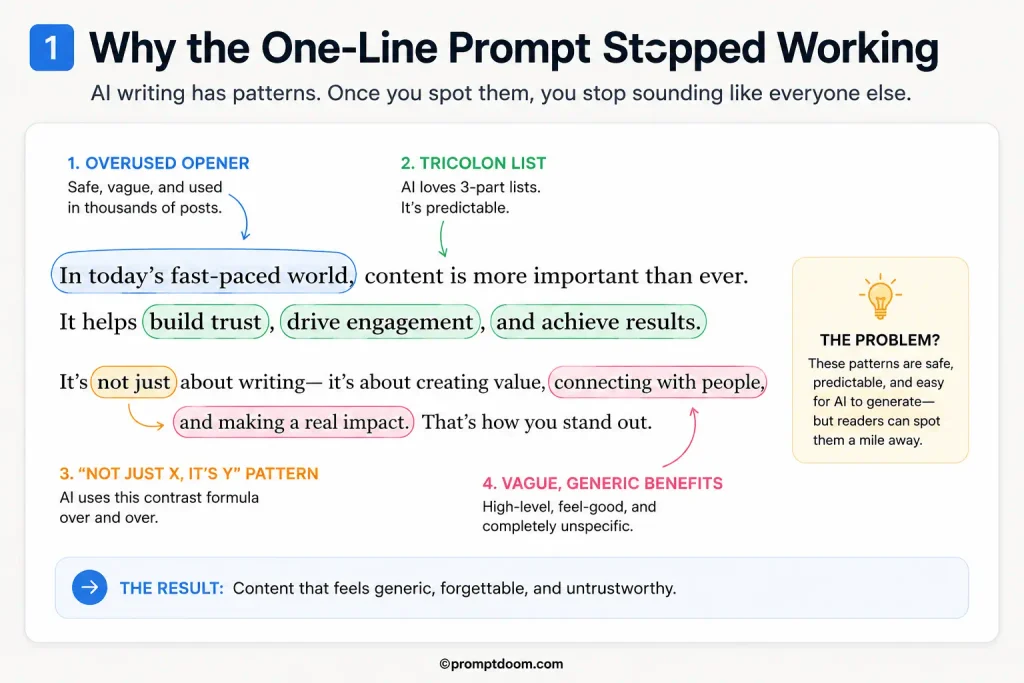
A bare prompt like “write a blog post about productivity tips for remote workers” gives ChatGPT nothing to draw on except the statistical average of everything ever written about that topic — which is precisely why the result reads as generic. It has no sense of who you are, what you actually think about the topic, or what your readers already know. Without that, it reaches for the same handful of default patterns nearly every model falls back on: an inspirational-sounding opener, a three-point list where each item is structurally identical to the last, and a closing line that restates the introduction. None of this is a flaw exactly — it’s what happens by default when a model has nothing specific to work from.
The Best Prompt Isn’t One Prompt — It’s This Three-Part System
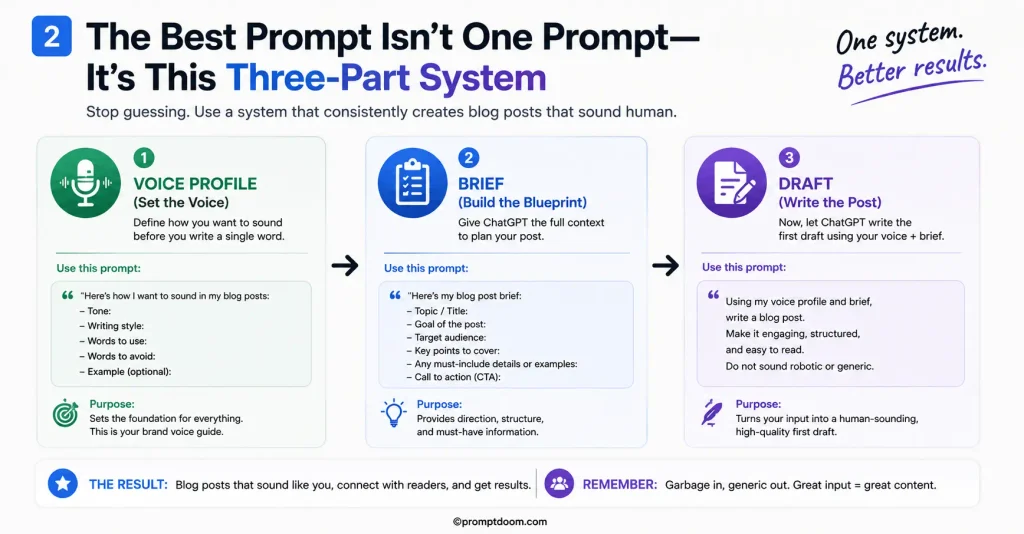
Part 1: Capture your voice, once.
“I’m going to paste in three pieces of writing that sound like me: [paste 2-3 short samples — an email, a social post, a past blog excerpt]. Analyze them and summarize my writing voice in a short profile: typical sentence length, tone, words or phrases I use often, and anything I clearly avoid. Don’t write anything yet — just give me the profile.”
Save the resulting profile somewhere you can paste it into future prompts, or add it to ChatGPT’s custom instructions (Settings → Personalization → Custom Instructions) so it’s applied automatically. This step only needs to happen once, and it’s the single biggest lever for making future output sound like you rather than a generic version of your topic.
Part 2: Build a real brief before drafting anything.
“Here’s my voice profile: [paste it]. I want to write a blog post about [topic] for [specific audience]. Here’s my actual take or angle on this topic, not just the generic advice: [your real opinion, experience, or specific point]. Before writing anything, list: the 3 most important points this post needs to make, one thing most articles on this topic get wrong or oversimplify, and a working title. Don’t write the post yet.”
This step forces something a bare prompt skips entirely — an actual point of view. Most generic AI-sounding posts are generic precisely because they present balanced, safe information with no real stance. Stating your actual take here, even briefly, gives the draft something to be built around.
Part 3: Draft against both.
“Using my voice profile and the brief above, write the full blog post. Follow my actual voice and sentence rhythm rather than defaulting to a neutral tone. Don’t open with a rhetorical question or a ‘in today’s world’ style statement. Vary sentence length — don’t make every sentence roughly the same length. Avoid the ‘not just X, it’s Y’ sentence pattern entirely. Where you make a list, make sure each point is genuinely distinct, not a rephrased version of the others. End with the specific point from my brief, not a generic summary.”
Run in sequence, these three prompts produce something meaningfully different from a single bare request — not because any one of them is a clever trick, but because together they supply the three things a one-line prompt structurally can’t: your actual voice, your actual point of view, and explicit instructions to avoid the exact patterns that make AI writing recognizable.
A Worked Example: One-Line Prompt vs. the Three-Part System
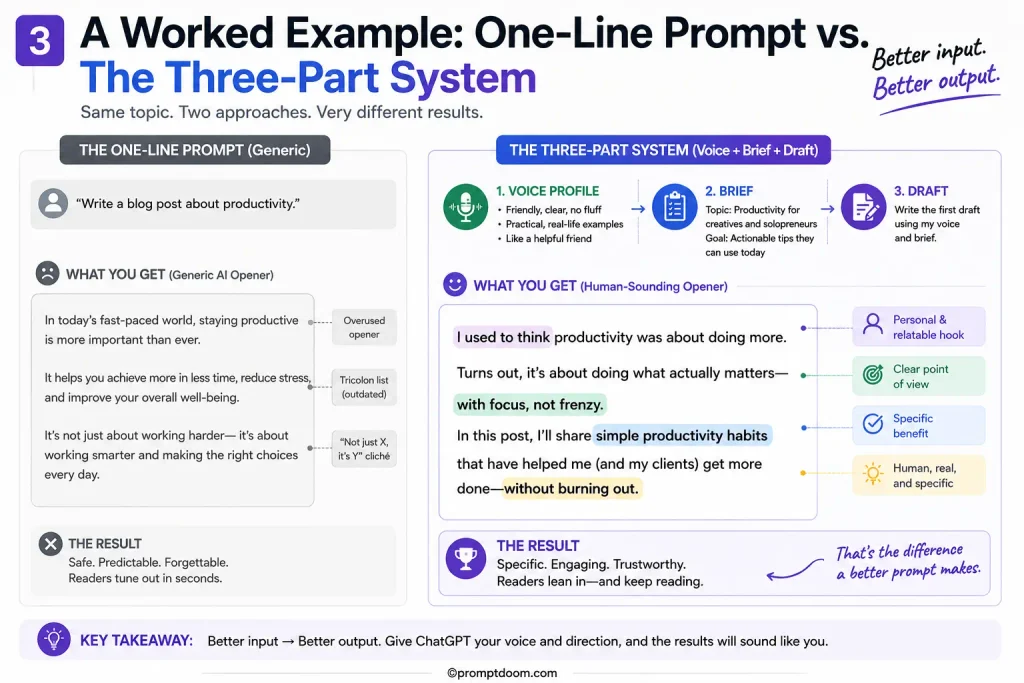
One-line prompt: “Write a blog post about the benefits of a four-day work week.”
Resulting opener: “In today’s fast-paced world, more and more companies are rethinking the traditional 9-to-5. The four-day work week isn’t just a trend — it’s a movement that’s reshaping how we think about productivity.”
Three-part system, using a sample voice profile (short sentences, slightly blunt, avoids corporate language) and a brief stating the real angle “most four-day-week coverage ignores that it only works with real workload cuts, not compressed hours”:
Resulting opener: “Most four-day work week pilots don’t actually cut anyone’s workload. They just compress five days of work into four, which explains why so many of them quietly fail after the initial press cycle. The ones that work do something less exciting: they cut the actual amount expected of people.”
The second version has a real, specific claim in the first two sentences, sentence lengths that vary naturally, and no opener that could be swapped onto any other topic without changing a word. Nothing in that difference came from a cleverer single sentence — it came from the draft having an actual voice and an actual point of view to work from, which the one-line version never had access to.
20 Universal ChatGPT Prompts for Any Blog Post
1. The angle finder
“I want to write about [topic]. Before I outline anything, give me 3 different angles I could take — not just 3 titles, but 3 genuinely different ways to frame the whole post. Tell me who each angle would appeal to most.”
2. The audience-gap prompt
“Here’s my topic: [topic]. Here’s my audience: [audience]. What does this specific audience already know that I don’t need to re-explain, and what’s the one thing they’re most likely confused or wrong about?”
3. The universal outline prompt
“Create an outline for a [post type: how-to / listicle / opinion / review / comparison] on ‘[topic]’, for [audience], around [word count] words. Structure it to match how this specific type of post is normally read, not a generic five-section template.”
4. The hook generator
“Give me 5 opening sentences for a post about [topic], each using a different technique: a specific claim, a real scenario, a surprising fact, a direct question to the reader, and a blunt statement of the problem. No ‘In today’s world’ style openers.”
5. The opinion-forcer
“Here’s my topic: [topic]. Here’s what most existing content says about it: [summarize the consensus]. What’s a defensible, slightly contrarian take I could genuinely argue, based on [your real experience/observation]?”
6. The section drafting prompt
“Write the section on [subtopic] for my post about [topic]. Audience: [audience]. Tone: [tone]. Include one specific example or detail, not generic advice. Keep it to roughly [word count] words.”
7. The “make it specific” prompt
“Here’s a paragraph from my draft: [paste paragraph]. It’s too generic — it could apply to almost any post on this topic. Rewrite it to include a specific number, example, or detail, or ask me for one if you need it.”
8. The pattern-avoidance prompt
“Rewrite this section to vary sentence length naturally, remove any ‘not just X, it’s Y’ construction, and make sure no two consecutive sentences start the same way: [paste section].”
9. The voice-matching prompt
“Here’s a sample of my writing: [paste sample]. Rewrite this section to match that voice — sentence rhythm, word choice, level of formality: [paste section to rewrite].”
10. The transition fixer
“Here are two sections of my post that feel disconnected: [paste both]. Write a 1-2 sentence transition that connects them naturally without a generic phrase like ‘moving on’ or ‘in addition.'”
11. The “so what” prompt
“Here’s a section of my draft: [paste section]. It states facts but doesn’t explain why the reader should care. Add one sentence per key point explaining the practical implication.”
12. The counterargument prompt
“I’m arguing [your position] in this post. What’s the strongest reasonable objection a smart reader would raise, and how would you address it without being dismissive?”
13. The conclusion prompt
“Write a closing section for my post about [topic]. Don’t summarize what was already said — instead, give the reader one clear takeaway or a forward-looking thought that adds something new.”
14. The title-and-meta prompt
“Based on this post: [paste intro/summary], write 5 title options under 60 characters and one meta description under 155 characters, each naturally including ‘[primary keyword]’ without forcing it.”
15. The FAQ builder
“Based on this post: [paste post or summary], write 5 FAQ questions a reader would realistically search, each answered in 40-60 words.”
16. The readability pass
“Review this draft for readability: [paste draft]. Flag any sentence over 30 words that should be split, and any paragraph over 5 sentences that should be broken up.”
17. The fact-check flag
“Review this draft for any claim, statistic, or statement that sounds plausible but isn’t clearly something I provided or sourced myself: [paste draft]. Flag it — don’t just let it stand.”
18. The internal-link finder
“Based on this post about [topic], suggest 3 natural internal linking opportunities to related content I might already have, described by topic rather than URL.”
19. The universal editor prompt
“Read this draft as a skeptical editor, not a cheerleader: [paste draft]. What’s the weakest section, and what’s one thing you’d cut entirely?”
20. The repurposing prompt
“Based on this post: [paste post], write one short social caption, one 3-line email teaser, and one single sentence that could work as a pull-quote.”
What to Do If the Draft Still Sounds Generic
Even with the full system in place, a draft occasionally still leans back toward generic patterns, usually because the voice profile or the stated angle was too thin. The fix is narrower than starting over: “This section still sounds generic: [paste the specific paragraph]. Rewrite it to match my voice profile more closely, and make sure it includes a specific detail or opinion, not just general advice.” Pointing at the specific paragraph, rather than asking for the whole post to be redone, produces a sharper fix and doesn’t undo the parts that already worked.
What the Evidence Suggests
The pattern across current writer feedback on this exact problem is consistent: the fix for AI-sounding output isn’t a cleverer one-line prompt, since a single prompt structurally can’t supply voice, point of view, and pattern-avoidance all at once. Splitting those three requirements into a short, reusable system — captured once for voice, rebuilt each time for the brief, and applied explicitly at the drafting stage — consistently produces output that needs less rewriting and reads as genuinely the author’s, rather than a technically correct but forgettable version of the topic.
Frequently Asked Questions
Why does my ChatGPT blog post always sound the same as everyone else’s?
Because a bare prompt gives ChatGPT nothing specific to draw from beyond the general average of everything written on that topic, so it defaults to the same handful of common patterns — generic openers, tidy three-point lists, and safe, balanced statements with no real point of view.
Do I need to build a new voice profile for every blog post?
No — the voice profile only needs to be created once and reused, or saved into ChatGPT’s custom instructions so it applies automatically. Only the brief and the stated angle need to be rebuilt for each new post.
Will this stop my content from being flagged by AI detectors?
It significantly reduces the recognizable patterns that both readers and AI detectors pick up on, since those patterns are largely a byproduct of generic, voiceless output. It’s not a guaranteed bypass, and the more reliable long-term fix is genuinely specific, opinionated writing rather than trying to evade detection directly.
What if I don’t have a strong opinion on the topic I’m writing about?
Even a modest, specific observation works better than no stance at all — something as simple as “most guides on this skip X” or “in my experience, Y matters more than people think” gives the draft something concrete to build around instead of defaulting to balanced, generic coverage.
Can I use this same system for other types of writing, not just blog posts?
Yes — the same three-part structure (voice, brief, drafting instructions) applies to emails, social posts, and reports. Only the specific pattern-avoidance instructions in the drafting step may need to change slightly by format.
Is it still necessary to edit the output after using this system?
Yes — this system produces a noticeably stronger starting draft, but a human editorial pass to check facts, tighten specific sentences, and confirm the voice genuinely matches is still the step that makes a post publish-ready.